Some cryptographic tools hide messages. A Caesar cipher shifts letters. An XOR cipher flips bits with a key. AES encrypts data so that someone with the right key can decrypt it later.
A hash function does something different. It does not hide the message. It fingerprints it.
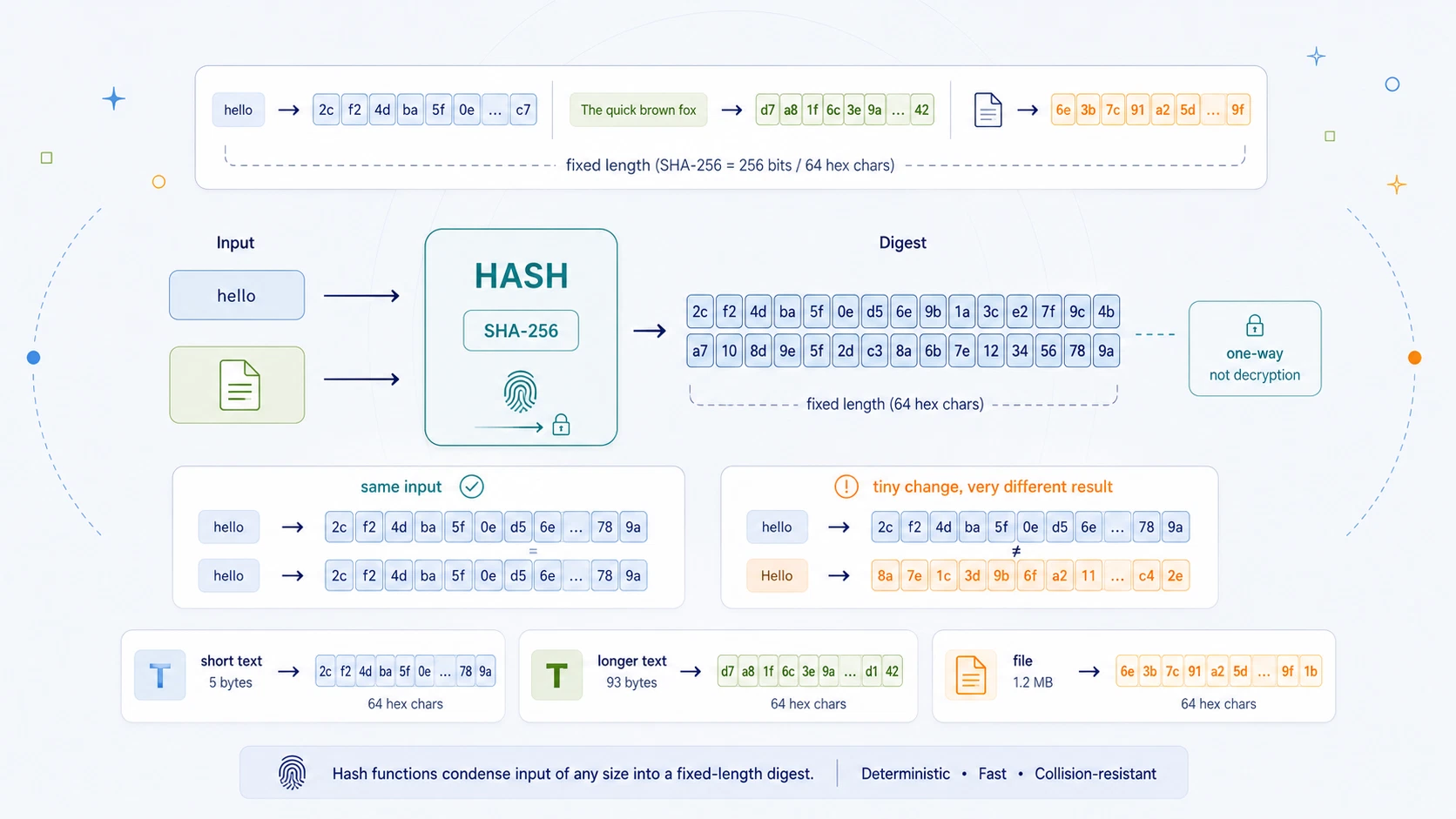
Give a hash function some text, a password, a file, a photo, a software download, or a block of transaction data, and it produces a fixed-length output called a hash, digest, or checksum.
For example, the SHA-256 hash of:
hello
is:
2cf24dba5fb0a30e26e83b2ac5b9e29e1b161e5c1fa7425e73043362938b9824
That long string is not an encrypted version of hello.
It is not something you decrypt.
It is a fingerprint.
If the input changes, the fingerprint changes. If the input stays exactly the same, the fingerprint stays exactly the same.
That makes hash functions useful for checking whether data has changed. A downloaded file can be checked against its published SHA-256 hash. A password can be stored as a salted hash instead of as plain text. A blockchain can link blocks together with hashes. A digital signature can sign a hash of a message rather than the whole message directly.
Hashes are everywhere in modern computing. But they are also widely misunderstood.
A hash is not encryption. A hash is not encoding. A hash is not compression. A hash is not meant to be reversed.
It is a one-way fingerprint of data. That is the central idea.
Hash Functions at a Glance
| Feature | Hash Function |
|---|---|
| Type | One-way cryptographic function |
| Main idea | Turn input data into a fixed-length digest |
| Common output format | Hexadecimal |
| Example algorithm | SHA-256 |
| Example input | hello |
| Example SHA-256 hash | 2cf24dba5fb0a30e26e83b2ac5b9e29e1b161e5c1fa7425e73043362938b9824 |
| Reversible? | No |
| Uses a key? | No, not for ordinary hashing |
| Same input gives same output? | Yes |
| Small input change gives different output? | Yes |
| Main uses | File verification, checksums, password storage, signatures, blockchains, data integrity |
| Security warning | MD5 and SHA-1 are legacy algorithms and should not be used for new security-sensitive designs |
| Best use | Learning one-way functions, fixed-length digests, integrity checking, and modern cryptographic foundations |
A hash function takes input of almost any size and produces a digest of a fixed size.
| Algorithm | Digest size |
|---|---|
| MD5 | 128 bits |
| SHA-1 | 160 bits |
| SHA-256 | 256 bits |
| SHA-384 | 384 bits |
| SHA-512 | 512 bits |
That fixed length is one of the first surprising things about hashing. The input can be a short word:
hello
or a large file. The hash still has the algorithm's fixed output size. With SHA-256, the output is always 256 bits, usually displayed as 64 hexadecimal characters.
What Is a Hash Function?
A hash function is a rule that takes data and produces a compact fingerprint of that data. In cryptography, a good hash function should have several important properties:
| Property | Meaning |
|---|---|
| Deterministic | The same input always gives the same hash |
| Fixed-length output | The digest length is fixed by the algorithm |
| Fast to compute | It should be practical to hash data efficiently |
| One-way | It should be infeasible to recover the input from the hash |
| Collision-resistant | It should be infeasible to find two different inputs with the same hash |
| Avalanche effect | Tiny input changes should cause large, unpredictable output changes |
The simplest way to think about it is this:
A hash function compresses the identity of some data into a fingerprint.
But that fingerprint is not a perfect miniature copy of the input.
It does not contain the original message in recoverable form.
The hash of hello does not secretly contain the letters H, E, L, L, and O in a form that can be unpacked.
It is the result of a one-way transformation.
That is why hashing is different from encryption. Encryption is designed to be reversible with the right key. Hashing is designed not to be reversible.
Hashing Is Not Encryption
This is the most important distinction. People often say things like:
Can you decrypt this SHA-256 hash?
But that question is based on a misunderstanding. You do not decrypt SHA-256. There is no SHA-256 decryption key. There is no reverse button. There is no hidden plaintext stored inside the digest.
A hash is not encrypted text. It is a fingerprint.
| Operation | Example | Reversible? | Needs a key? | Main purpose |
|---|---|---|---|---|
| Encoding | Base64, Hex, URL encoding | Yes | No | Represent data in another format |
| Encryption | AES, XOR with key | Yes, with key | Yes | Hide data from people without the key |
| Hashing | SHA-256, SHA-512 | No | No | Fingerprint data and check integrity |
This table is worth remembering. Encoding changes how data is written. Encryption hides data so it can later be recovered with a key. Hashing fingerprints data so it can be recognised or checked.
So if you Base64-encode a message, someone can decode it. If you AES-encrypt a message, someone with the key can decrypt it. If you SHA-256-hash a message, there is no intended way to recover the original message from the digest.
That is not a limitation. That is the point.
How Does Hashing Work Conceptually?
A real hash algorithm like SHA-256 has detailed internal machinery: padding, blocks, compression functions, bitwise operations, constants, and repeated rounds. But the basic concept can be understood without going inside every round.
At a high level, a cryptographic hash function does this:
- Read the input data as bytes.
- Process the data through a fixed algorithm.
- Mix the input heavily across many internal steps.
- Produce a fixed-length digest.
- Make it extremely hard to reverse or deliberately collide.
A simple conceptual diagram looks like this:
Input data -> Hash function -> Fixed-length digest
For SHA-256:
hello -> SHA-256 -> 2cf24dba5fb0a30e26e83b2ac5b9e29e...
The input can be tiny:
a
or large:
a 4 GB video file
The SHA-256 output is still 256 bits. This is different from encryption. With encryption, a longer plaintext usually gives a longer ciphertext. With hashing, the digest size is fixed by the algorithm.
That means a hash cannot contain all the information from large inputs in a reversible way. There are infinitely many possible inputs but only a finite number of possible hash outputs. So collisions must exist in theory.
A collision means two different inputs produce the same hash. The security goal is not to make collisions mathematically impossible. That cannot be done for arbitrary input length and fixed output length. The goal is to make useful collisions infeasible to find.
The Avalanche Effect
A good cryptographic hash function should be extremely sensitive to input changes. Change one character and the output should change completely.
For example:
hello
has this SHA-256 hash:
2cf24dba5fb0a30e26e83b2ac5b9e29e1b161e5c1fa7425e73043362938b9824
But:
Hello
has this SHA-256 hash:
185f8db32271fe25f561a6fc938b2e264306ec304eda518007d1764826381969
Only one letter changed.
Lowercase h became uppercase H.
But the digest became completely different.
That is the avalanche effect.
A tiny input change should avalanche through the hash algorithm so that the output changes widely and unpredictably. This matters because a hash should not leak obvious patterns. If similar inputs gave visibly similar hashes, attackers could learn too much. They could look at hash outputs and infer relationships between the original inputs.
Good cryptographic hashes avoid that. They behave like a fingerprint machine where every tiny change produces a new-looking fingerprint.
A Worked Example: Hashing "hello" with SHA-256
Now hash the text:
hello
using SHA-256. The output is:
2cf24dba5fb0a30e26e83b2ac5b9e29e1b161e5c1fa7425e73043362938b9824
That digest is usually shown in hexadecimal. Hexadecimal is useful because each byte can be shown as two hex characters. SHA-256 produces 256 bits.
Since:
256 bits = 32 bytes
and each byte needs two hex characters:
32 x 2 = 64
a SHA-256 digest is usually displayed as 64 hex characters.
| Item | Value |
|---|---|
| SHA-256 digest size | 256 bits |
| Bytes | 32 bytes |
| Hex characters | 64 hex characters |
Now compare the input and output:
| Input | Algorithm | Output |
|---|---|---|
hello |
SHA-256 | 2cf24dba5fb0a30e26e83b2ac5b9e29e1b161e5c1fa7425e73043362938b9824 |
This is deterministic.
Every time you hash exactly the text hello with SHA-256, you get the same digest.
But exact means exact.
These are all different inputs:
hello
Hello
hello
The last one has a trailing space. Humans may overlook that difference. A hash function will not. Different bytes mean different input. Different input should produce a different digest.
Hashing Text vs Hashing Files
A hash function does not really care whether the input is text or a file. It sees bytes.
Text is bytes. Images are bytes. PDFs are bytes. ZIP files are bytes. Software installers are bytes.
That is why file hashing is so useful. A software project might publish a SHA-256 checksum next to a download. After downloading the file, you can hash your local copy and compare it with the published value.
If the hashes match, the file you downloaded is very likely exactly the file that was intended. If the hashes do not match, something changed.
That change might be innocent:
- Incomplete download
- Corrupted transfer
- Wrong file version
- Copy/paste error
- Different line endings
- Extra metadata
- Accidental modification
Or it might be serious:
- Tampered file
- Malicious replacement
- Compromised mirror
- Altered installer
The hash does not tell you why the file changed. It tells you that it changed. That is enough to make hashing one of the simplest and most useful integrity tools in computing.
Hash Comparison: The Practical Use
One of the most practical uses of a hash generator is comparison. You have:
- Some input data.
- An expected hash.
- A newly calculated hash.
Then you ask:
Do they match?
| Calculated hash | Expected hash | Meaning |
|---|---|---|
| Same | Same | The input matches |
| Different | Different | The input has changed, or the expected hash is wrong |
This is useful for software downloads, backups, shared files, archives, and any situation where you want to check data integrity.
For example, the expected SHA-256 might be:
2cf24dba5fb0a30e26e83b2ac5b9e29e1b161e5c1fa7425e73043362938b9824
If your calculated SHA-256 is also:
2cf24dba5fb0a30e26e83b2ac5b9e29e1b161e5c1fa7425e73043362938b9824
then the hashes match. If your calculated value is even one character different, it does not match.
With cryptographic hashes, "nearly the same" is not a success. A hash either matches or it does not.
Common Hash Algorithms
There are many hash algorithms, but a small number appear again and again in everyday tools.
| Algorithm | Output size | Status | Typical use today |
|---|---|---|---|
| MD5 | 128 bits | Broken for collision resistance | Legacy checksums only |
| SHA-1 | 160 bits | Broken for collision resistance | Legacy compatibility only |
| SHA-256 | 256 bits | Modern common choice | File checks, signatures, Bitcoin, general hashing |
| SHA-384 | 384 bits | Modern SHA-2 family | Higher-security contexts |
| SHA-512 | 512 bits | Modern SHA-2 family | Higher-security contexts, 64-bit systems |
For general modern use, SHA-256 is usually the best default. It is widely supported, familiar, and strong enough for many ordinary integrity and cryptographic uses. SHA-512 is also strong and common, especially in contexts where 512-bit output is useful. SHA-384 is part of the same SHA-2 family and is also a modern option.
MD5 and SHA-1 are different. They are historically important and still appear in older systems, old checksums, and compatibility tools, but they should not be used for new security-sensitive designs.
That does not mean an MD5 checksum is always useless. It can still detect accidental corruption. But it is not safe when an attacker can deliberately construct inputs. That distinction matters. Accidental error detection and adversarial security are not the same thing.
MD5 and SHA-1: Why Legacy Hashes Are Dangerous
MD5 and SHA-1 are still famous because they were widely used for years. They are also famous because they are no longer considered safe for collision-resistant security.
A collision means two different inputs produce the same hash. For a secure cryptographic hash, it should be infeasible for an attacker to deliberately find such a pair.
With MD5, practical collision attacks have been known for a long time. With SHA-1, the situation is also broken for collision resistance. It should not be used for digital signatures, certificates, or new systems that depend on collision resistance.
The danger is not merely theoretical. If an attacker can create two different files with the same hash, they may be able to trick a system that relies on that hash as proof of identity. That is why modern systems moved away from MD5 and SHA-1 for security-sensitive work.
| Algorithm | Use for learning? | Use for legacy checks? | Use for new security? |
|---|---|---|---|
| MD5 | Yes | Sometimes | No |
| SHA-1 | Yes | Sometimes | No |
| SHA-256 | Yes | Yes | Yes, in appropriate designs |
| SHA-512 | Yes | Yes | Yes, in appropriate designs |
The word "appropriate" matters. Even a strong hash can be used badly. For example, plain SHA-256 is not enough for safe password storage by itself. Password storage needs salts and deliberately slow password-hashing algorithms.
The algorithm matters. The use matters too.
Hashing Passwords
Passwords are one of the most common places where people hear about hashes. A website should not store your actual password in plain text. Instead, it should store a password hash.
Then, when you log in:
- You type your password.
- The site hashes what you typed.
- It compares that new hash with the stored hash.
- If they match, the password was correct.
The site does not need to decrypt your password. It only needs to check whether the password you entered produces the expected hash.
But password hashing has special requirements. Ordinary fast hashes like SHA-256 are designed to be efficient. That is good for file checks. It is bad for password storage.
Attackers can guess huge numbers of passwords very quickly if the hash is too fast. That is why proper password storage uses:
- A unique salt for each password
- A password-hashing algorithm designed to be slow
- Algorithms such as bcrypt, scrypt, Argon2, or PBKDF2
- Careful server-side implementation
A salt is random data added to the password before hashing. It prevents identical passwords from producing identical stored hashes and helps defeat precomputed lookup tables.
For example:
password + unique salt -> password hash
The salt is not meant to be secret in the same way as a password. Its job is to make each stored hash unique and harder to attack at scale.
So the lesson is:
Hashes are part of password storage, but plain SHA-256 of a password is not enough.
For real password systems, use established password-hashing libraries. Do not invent your own.
Hashes in Bitcoin and Blockchains
Hashes are also central to cryptocurrency systems. Bitcoin, for example, uses hash functions in several ways, including block identifiers, proof-of-work, transaction structures, and address-related processes.
At a conceptual level, a blockchain uses hashes to make tampering visible. A block can include the hash of the previous block. If someone changes old block data, that block's hash changes. Because later blocks depend on earlier hashes, the change breaks the chain of references.
The structure is roughly:
Block 1 data -> Hash 1
Block 2 includes Hash 1 -> Hash 2
Block 3 includes Hash 2 -> Hash 3
This does not mean "hashes alone create trust". Blockchains also depend on consensus rules, proof-of-work or other mechanisms, network validation, economic incentives, signatures, and many other details.
But hashes are one of the basic building blocks. They make data commitment possible. A hash lets you say:
I am committing to this exact data, without needing to show all of it again every time.
Change the data and the commitment changes. That idea appears far beyond cryptocurrency. It appears in version control, digital signatures, package managers, backups, distributed systems, and secure logs.
Hashing and Digital Signatures
Digital signatures also commonly involve hashes. Instead of signing a large message directly, a system often hashes the message first, then signs the hash.
Conceptually:
Message -> Hash -> Signature
Later, someone can verify the signature by checking the message hash. This is useful because hash functions produce fixed-length digests. The signature algorithm can work with that digest rather than with arbitrary-length input.
The hash acts as a compact representative of the message. If the message changes, the hash changes. If the hash changes, the signature verification fails.
That gives digital signatures their integrity property: they do not merely identify a signer; they also bind the signer to the exact message.
Again, hashing is not encryption. A signature does not necessarily hide a message. A hash does not necessarily hide a message. The point is integrity, identity, and verification.
Weaknesses and Limitations
Hash functions are powerful, but they are not magic. Their main limitations are:
| Limitation | Why it matters |
|---|---|
| Not reversible | You cannot recover the original input from the hash |
| Collisions exist in theory | Fixed-length output cannot uniquely represent unlimited inputs |
| Weak algorithms can be attacked | MD5 and SHA-1 should not be used for new security-sensitive work |
| Fast hashes are bad for passwords | Attackers can test guesses quickly |
| Hashes do not prove source by themselves | A matching hash only helps if the expected hash is trustworthy |
| Hashes do not encrypt | Anyone with the input can calculate the same hash |
| Hashes do not stop tampering alone | They detect changes only when compared with a trusted expected value |
The "trusted expected value" point is important. Suppose you download a file from a malicious site, and the same malicious site gives you the hash. The hash may match perfectly. That only proves the file matches the hash from that site. It does not prove the file is safe.
A hash is strongest when the expected digest comes from a trusted, independent, authenticated source. For example:
- Official project website
- Signed release notes
- Trusted package manager
- Verified repository
- Secure channel
- Digital signature
Hash comparison is useful. But trust still has to come from somewhere.
Can Hashes Be Broken?
A hash is "broken" when an attacker can violate one of the properties the hash is supposed to provide. Different attacks target different properties.
| Attack type | Goal |
|---|---|
| Preimage attack | Given a hash, find an input that produces it |
| Second-preimage attack | Given one input, find a different input with the same hash |
| Collision attack | Find any two different inputs with the same hash |
| Length-extension attack | Exploit certain hash constructions when used incorrectly |
| Brute-force guessing | Try likely inputs until one produces the target hash |
For ordinary users, the most visible attacks are usually:
- Collision attacks against old algorithms
- Brute-force attacks against weak password hashes
A collision attack says:
Find two different inputs with the same hash.
A password guessing attack says:
Try possible passwords until one gives the stolen hash.
Those are different problems. That is why context matters. A hash used for file integrity is not being used in exactly the same way as a hash used for password storage. A secure design has to choose the right tool for the right threat.
Related Tools and Concepts
| Tool or concept | Relationship to hashing |
|---|---|
| Hex Encoder / Decoder | Hashes are often displayed as hex strings |
| Base64 Encoder / Decoder | Hash bytes can also be displayed as Base64 |
| XOR Cipher | Helps explain byte-level operations, but XOR is reversible with a key |
| HMAC | A keyed hash used for message authentication |
| Digital Signatures | Often sign a hash of a message |
| Password Hashing | Uses salts and slow algorithms to store password verifiers |
| Checksums | Broader family of integrity checks; not all are cryptographic |
| Bitcoin / Blockchains | Use hashes for linking, proof-of-work, and data commitment |
| File Verification | Uses hashes to check downloads and backups |
| AES Encryption | Encryption hides data; hashing fingerprints it |
| One-Time Pad | Uses a key stream to hide data; hashing uses no decryption key |
Hashing sits beside several other CipherRegister topics. It connects naturally to encodings because digest bytes are usually displayed as hex or Base64. It connects to modern cryptography because signatures, HMAC, blockchains, and password systems all depend on hash-like ideas. It also helps clarify what encryption is not.
A hash generator is not an encryption tool. It is an integrity and fingerprinting tool. That distinction is one of the most useful things a beginner can learn.
Where Hashes Appear Today
Hash functions appear constantly in ordinary computing, even when users do not notice them. You may encounter hashes in:
- Software download verification
- Package managers
- Git commits
- Password storage
- Digital signatures
- TLS certificates
- Cryptocurrency wallets
- Bitcoin mining
- Blockchain explorers
- File deduplication
- Backup systems
- Malware analysis
- Forensic file identification
- API authentication
- HMAC-based request signing
- Integrity checks in archives
That range is one reason hashing is worth learning early. It is not an obscure cryptographic trick. It is a practical foundation.
Once you understand hashes, many modern security ideas become clearer:
- Why downloads publish checksums
- Why passwords should not be stored directly
- Why changing one bit can invalidate a signature
- Why Git can identify content by hash
- Why blockchains can link records together
- Why HMAC needs a secret key
- Why encoding, encryption, and hashing are different categories
Hashing is one of the quiet mechanisms behind modern digital trust. It rarely looks dramatic. But it is everywhere.
A Simple Python Hash Generator
Python includes hash algorithms in its standard library through the hashlib module.
The script below can:
- Hash text with SHA-256
- Hash text with SHA-512
- Show the digest as hex
- Compare a calculated hash with an expected hash
Python exampleShow code
import hashlib


def hash_text(text, algorithm="sha256"):
    data = text.encode("utf-8")
    hasher = hashlib.new(algorithm)
    hasher.update(data)
    return hasher.hexdigest()


def compare_hash(text, expected_hash, algorithm="sha256"):
    calculated = hash_text(text, algorithm)
    expected_clean = expected_hash.strip().lower()

    return calculated == expected_clean, calculated


text = "hello"

sha256_hash = hash_text(text, "sha256")
sha512_hash = hash_text(text, "sha512")

print("Text       :", text)
print("SHA-256    :", sha256_hash)
print("SHA-512    :", sha512_hash)

expected = "2cf24dba5fb0a30e26e83b2ac5b9e29e1b161e5c1fa7425e73043362938b9824"

matches, calculated = compare_hash(text, expected, "sha256")

print("Expected   :", expected)
print("Calculated :", calculated)
print("Match      :", matches)
Expected SHA-256 output for hello:
2cf24dba5fb0a30e26e83b2ac5b9e29e1b161e5c1fa7425e73043362938b9824
The full SHA-512 output is longer because SHA-512 produces a 512-bit digest.
Hashing a File in Python
Hashing a file uses the same idea, but the file is read in chunks. That matters because large files should not always be loaded into memory all at once.
import hashlib


def hash_file(path, algorithm="sha256", chunk_size=1024 * 1024):
    hasher = hashlib.new(algorithm)

    with open(path, "rb") as file:
        while True:
            chunk = file.read(chunk_size)

            if not chunk:
                break

            hasher.update(chunk)

    return hasher.hexdigest()


file_path = "example.zip"
digest = hash_file(file_path, "sha256")

print("File   :", file_path)
print("SHA256 :", digest)
The important difference is the file mode:
rb
That means "read binary". For file hashing, you want the exact bytes of the file. You do not want Python to treat the file as text, change line endings, decode characters, or interpret the contents.
Hashing is about exact bytes. Exactness is everything.
Reading the Code Like the Hash Function
The most important line in the text example is:
data = text.encode("utf-8")
That converts the text into bytes. Hash functions work on bytes, not on human meaning.
The next important line is:
hasher = hashlib.new(algorithm)
That creates a hash object for the selected algorithm. For example:
sha256
or:
sha512
Then:
hasher.update(data)
feeds the bytes into the hash function.
Finally:
return hasher.hexdigest()
returns the digest as hexadecimal text.
The file example follows the same logic, but it feeds the data in chunks:
chunk = file.read(chunk_size)
and:
hasher.update(chunk)
This allows the program to hash large files without loading the whole file into memory.
The code follows the same rhythm as the concept:
- Get the exact bytes.
- Feed them into the hash algorithm.
- Produce a fixed-length digest.
- Compare that digest with an expected value if needed.
There is no decrypt function. That absence is not an omission. It is the nature of hashing.
Common Questions About Hash Functions
Is a hash the same as encryption? No. Encryption is reversible with the right key. Hashing is not meant to be reversible. A hash is a fingerprint of data, not a hidden copy of the data.
Can SHA-256 be decrypted? No. SHA-256 is a hash function, not an encryption algorithm. There is no SHA-256 decryption key. If someone finds an input that produces a given SHA-256 hash, they have not decrypted it. They have guessed or found a matching input. For strong random inputs, that should be infeasible. For weak predictable inputs, such as common passwords, guessing may be possible.
Why does the same text always give the same hash? Hash functions are deterministic. That means the same input bytes always produce the same output digest. This is necessary because hash comparison would be useless if the result changed randomly each time.
Why does a tiny change produce a totally different hash? That is the avalanche effect. A good cryptographic hash function mixes the input so thoroughly that changing one bit should change many output bits in an unpredictable way. This helps prevent attackers from seeing obvious relationships between similar inputs.
What is the best hash algorithm to use? For general modern hashing, SHA-256 is a good default. SHA-512 is also widely used and produces a longer digest. MD5 and SHA-1 should only be used for legacy compatibility or non-adversarial checks, not for new security-sensitive systems.
Is MD5 still useful? MD5 can still detect accidental file corruption in some legacy or non-security contexts. But MD5 is broken for collision resistance and should not be used where an attacker might deliberately create matching hashes.
| Use | MD5? |
|---|---|
| Learning | Yes |
| Legacy checksum comparison | Sometimes |
| Modern security | No |
Is SHA-1 still useful? SHA-1 is also a legacy algorithm. It may still appear in old systems, but it should not be used for new designs that rely on collision resistance. Prefer SHA-256 or stronger modern alternatives.
Why are hashes usually shown in hex? Hash functions produce bytes. Hex is a convenient way to display those bytes as readable text. Each byte becomes two hexadecimal characters. That makes hashes easy to copy, compare, store, and publish.
What is the difference between a hash and a checksum? A checksum is a broad term for a value used to check data integrity. Some checksums are simple and designed only to catch accidental errors. Cryptographic hashes are stronger. They are designed to resist deliberate manipulation as well as accidental changes. All cryptographic hashes can be used as checksums, but not all checksums are cryptographic hashes.
Can two different files have the same hash? In theory, yes. Because a fixed-length hash has a finite number of outputs, and there are more possible files than possible hashes. That is called a collision. For a secure hash algorithm, finding such a collision should be infeasible. For broken algorithms like MD5 and SHA-1, practical collision attacks are the reason they should not be used for new security-sensitive work.
Does a matching hash prove a file is safe? Not by itself. A matching hash proves that the file matches the expected hash. But the expected hash must come from a trusted source. If a malicious site gives you both a malicious file and the hash of that malicious file, the hash can match perfectly. The hash proves sameness. It does not automatically prove trust.
Should I use SHA-256 for passwords? Not by itself. Plain SHA-256 is too fast for password storage. Passwords should be stored using a proper password-hashing algorithm such as bcrypt, scrypt, Argon2, or PBKDF2, with a unique salt and appropriate work factor. SHA-256 is useful, but password storage needs a more specialised approach.
The Real Lesson of Hash Functions
A hash function should not be mistaken for encryption. Not for private messages. Not for passwords by itself. Not for secret files. Not for hiding information.
A hash does not hide data so it can later be revealed. It fingerprints data so it can later be recognised. That is a different power.
It shows that identity can be separated from content. It shows that exact bytes matter. It shows that tiny changes can be made visible. It shows why integrity is different from secrecy. It shows why modern systems need more than encryption alone.
And perhaps most importantly, it gives beginners one of the cleanest distinctions in cryptography:
Encoding represents data.
Encryption hides data.
Hashing fingerprints data.
Once you understand that, a lot of modern security becomes less foggy. Checksums, password storage, signatures, HMAC, Git commits, blockchain links, package verification, and file integrity all start to make more sense.
That is why hash functions still matter. Not because they encrypt. Because they let digital systems recognise, compare, verify, and commit to exact data.
A hash is not a secret message. It is a digital fingerprint.