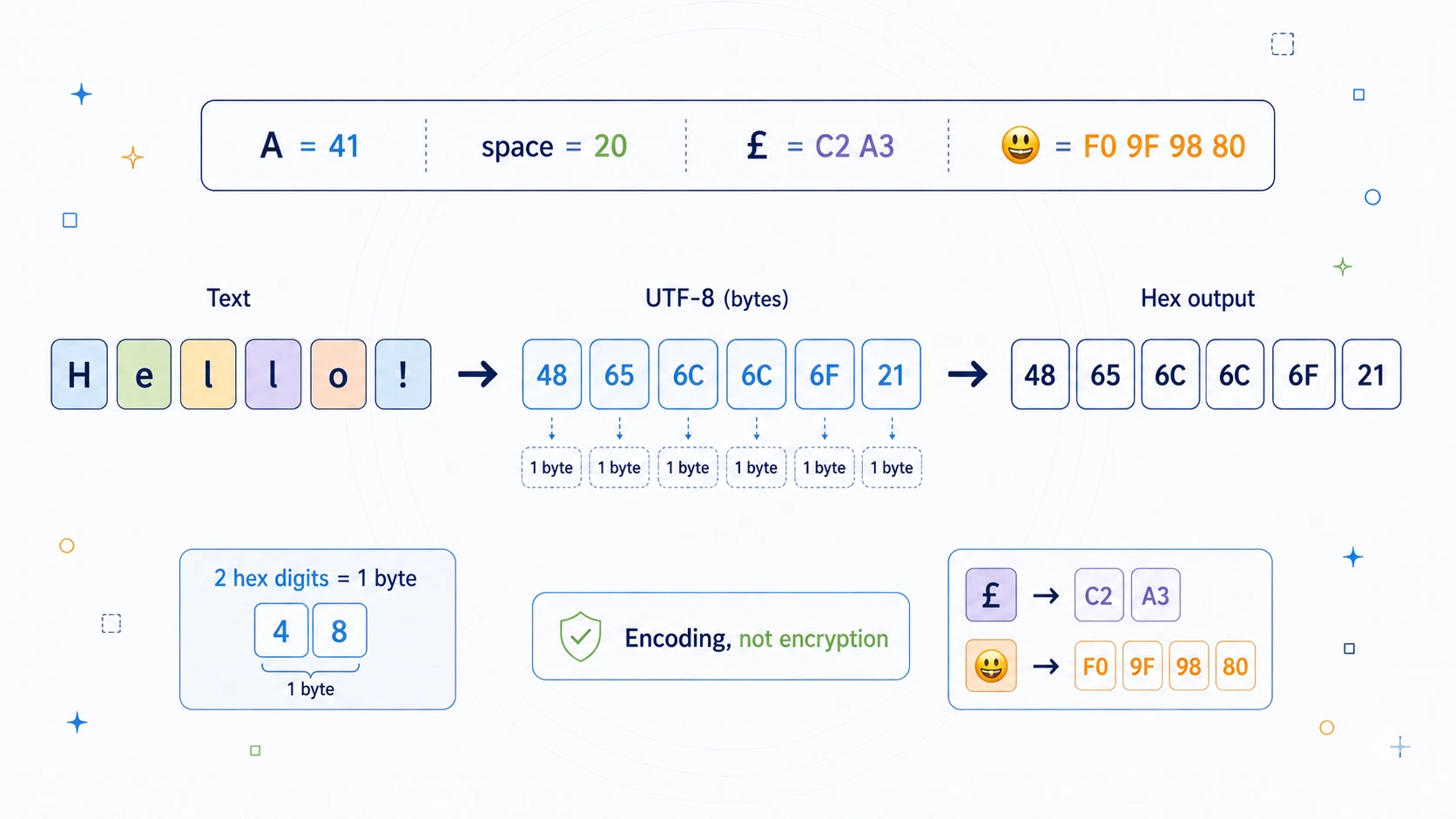
Hexadecimal looks cryptic the first time you see it. A normal word disappears into pairs of numbers and letters: Hello becomes 48 65 6c 6c 6f.
At a glance, that can look like a secret code. It has numbers. It has letters from a to f. It appears in programming, hashes, files, colours, memory dumps, network traffic, certificates, escaped strings, and debugging tools.
But hex is not encryption. It does not hide meaning from anyone who knows how to read it. Hexadecimal is a way of writing bytes. That is its real job.
Computers store data as bytes. Text, images, files, keys, hashes, packets, emojis, and encrypted data all become bytes somewhere underneath. Hex gives those bytes a compact, readable form using sixteen symbols: 0 1 2 3 4 5 6 7 8 9 a b c d e f.
Each byte is written as exactly two hex digits. The byte value for capital A is 41, the byte value for a space is 20, and the byte value for an exclamation mark is 21. Hex is not glamorous or secret, but it gives you a window into what text and data look like underneath.
Hex turns invisible bytes into something you can inspect.
Hex Encoder / Decoder at a glance
| Feature | Hex Encoder / Decoder |
|---|---|
| Type | Encoding |
| Base | 16 |
| Alphabet | 0-9 and a-f |
| Secret key | None |
| Byte size | 2 hex digits per byte |
| Example byte | A = byte value 41 |
| Example text | Hello -> 48 65 6c 6c 6f |
| Input encoding | Text is converted to UTF-8 bytes before hex encoding |
| Output casing | Lowercase a-f or uppercase A-F |
| Optional formatting | Spaces, custom separators, 0x prefixes, line wrapping |
| Decryption? | No. Decoding simply reverses the encoding |
| Security | Not encryption |
| Best use | Inspecting bytes, hashes, binary data, text encoding, debugging, and programming formats |
Hex is best understood as a byte display format. It does not make text private. It makes bytes visible.
What is hexadecimal encoding?
Hexadecimal encoding is a way of writing binary data using base 16. The word hexadecimal means sixteen-based.
Ordinary decimal uses ten symbols:
0 1 2 3 4 5 6 7 8 9
Hexadecimal uses sixteen symbols:
0 1 2 3 4 5 6 7 8 9 a b c d e f
The extra letters represent the values ten to fifteen.
| Decimal value | Hex digit |
|---|---|
| 0 | 0 |
| 1 | 1 |
| 2 | 2 |
| 3 | 3 |
| 4 | 4 |
| 5 | 5 |
| 6 | 6 |
| 7 | 7 |
| 8 | 8 |
| 9 | 9 |
| 10 | a |
| 11 | b |
| 12 | c |
| 13 | d |
| 14 | e |
| 15 | f |
This is useful because a byte contains 8 bits, and one hex digit represents 4 bits.
| Unit | Size |
|---|---|
| 1 hex digit | 4 bits |
| 2 hex digits | 8 bits |
| 1 byte | 8 bits |
That gives the central rule:
1 byte = 2 hex digits
So the byte value 65 in decimal is written as:
41
In UTF-8 and ASCII, 41 is the byte for capital A.
How does hex encoding work?
Hex encoding does not encrypt text directly. It first turns text into bytes, usually using UTF-8. Then each byte is displayed as two hexadecimal digits.
For the word:
Hello
the UTF-8 bytes are:
| Character | Decimal byte | Hex byte |
|---|---|---|
| H | 72 | 48 |
| e | 101 | 65 |
| l | 108 | 6c |
| l | 108 | 6c |
| o | 111 | 6f |
So:
Hello -> 48 65 6c 6c 6f
The letters a to f in hex are not alphabetic characters in the message. They are digits in a base-16 number system. The c in 6c means decimal 12 in the low half of that byte.
Why 41 means A
The byte 41 is hexadecimal. In decimal, it means:
4 x 16 + 1 = 65
The value 65 is the character code for capital A in ASCII and UTF-8. So:
A -> byte value 65 -> hex 41
That does not mean 41 is a secret replacement for A. It means 41 is one way to write the byte that represents A.
The same idea applies to common punctuation:
| Character | Hex |
|---|---|
| Space | 20 |
| ! | 21 |
| . | 2e |
| 0 | 30 |
| A | 41 |
| a | 61 |
Uppercase A and lowercase a have different byte values, so they have different hex values.
Using the CipherRegister Hex tool
The Hex Encoder / Decoder tool lets you convert readable text into hex bytes and decode hex bytes back into text.
| Control | What it does |
|---|---|
| Encode | Converts text into UTF-8 bytes, then displays those bytes as hex |
| Decode | Converts valid hex byte pairs back into UTF-8 text |
| Uppercase output | Shows A-F instead of a-f |
| Byte separator | Chooses spaces, no separator, or a custom separator |
| Add 0x byte prefixes | Displays bytes like 0x48 0x65 |
| Accept 0x prefixes | Lets the decoder handle 0x byte notation |
| Line wrapping | Splits long output into readable lines |
These options change formatting. They do not make the data more secret.
For example, these all represent the same bytes:
48 65 6c 6c 6f
48656c6c6f
0x48 0x65 0x6c 0x6c 0x6f
48-65-6c-6c-6f
They all decode to:
Hello
Key and rules
Hex has no secret key. It is a reversible encoding.
| Rule | Explanation |
|---|---|
| Use base 16 | Hex uses digits 0-9 and letters a-f |
| Two hex digits per byte | Each byte needs exactly two hex digits |
| Text becomes bytes first | The tool uses UTF-8 before encoding |
| Hex is case-insensitive | ff, FF, and Ff mean the same byte |
| Separators are formatting | Spaces and prefixes help readability |
| Decoding needs valid pairs | An odd number of cleaned hex digits is incomplete |
| Not encryption | Anyone can decode it without a key |
The important distinction is:
encoding is not encryption
Encryption needs a secret key and a security goal. Hex just rewrites bytes in a readable base-16 form.
Worked example: Meet at dawn!
Now encode:
Meet at dawn!
using UTF-8 and hex.
First write the characters as byte values:
| Character | Hex |
|---|---|
| M | 4d |
| e | 65 |
| e | 65 |
| t | 74 |
| Space | 20 |
| a | 61 |
| t | 74 |
| Space | 20 |
| d | 64 |
| a | 61 |
| w | 77 |
| n | 6e |
| ! | 21 |
Put the bytes together:
Meet at dawn! -> 4d 65 65 74 20 61 74 20 64 61 77 6e 21
The 20 bytes are spaces. The 21 byte is the exclamation mark.
If the same output is shown without spaces, it becomes:
4d656574206174206461776e21
That is the same data, only with different formatting.
UTF-8 and multi-byte characters
Basic English letters usually use one byte each in UTF-8. But characters such as £, é, €, and emojis usually need multiple bytes.
| Character | Hex |
|---|---|
| A | 41 |
| £ | c2 a3 |
| € | e2 82 ac |
| 😀 | f0 9f 98 80 |
UTF-8 uses one to four bytes depending on the character.
This is why one visible character does not always equal one byte. A hex encoder is showing the bytes, not the number of visible characters.
What leaks from hex?
Hex leaks everything, because it is not trying to hide anything.
If the bytes represent readable text, anyone who knows hex can decode them. If the bytes represent a file, hash, packet, or encrypted message, hex shows the bytes of that object.
That does not mean hex is useless. It means hex is honest. It is a display format, not a lock.
Common clues include:
| Pattern | Meaning |
|---|---|
20 |
Space in ASCII/UTF-8 text |
0a |
Line feed / newline |
41 to 5a |
Uppercase English letters |
61 to 7a |
Lowercase English letters |
| Repeated byte pairs | Repeated byte values |
If you see many 20 bytes, you may be looking at ordinary text with spaces.
Why hex is useful
Hex is useful because it makes bytes readable without needing to print the bytes as characters.
| Use | Why hex helps |
|---|---|
| Debugging | Shows exact byte values |
| Hashes | Displays binary digests as text |
| File inspection | Reveals file headers and byte patterns |
| Networking | Shows packet bytes clearly |
| Programming | Represents byte constants compactly |
| Colours | Web colours use hex notation such as #3366ff |
| Encoded data | Helps inspect Base64-decoded or encrypted bytes |
For example, a SHA-256 hash is 32 bytes. Displayed as hex, it becomes 64 hex digits.
The hex is not the hash algorithm. It is the way the hash bytes are shown.
Hex vs Base64
Hex and Base64 both represent bytes as text, but they use different systems.
| Feature | Hex | Base64 |
|---|---|---|
| Base | 16 | 64 |
| Unit | 1 byte -> 2 hex digits | 3 bytes -> 4 Base64 characters |
| Alphabet | 0-9 and a-f | A-Z, a-z, 0-9, plus symbols |
| Compactness | Less compact | More compact |
| Readability | Very easy byte-by-byte | Less direct byte-by-byte |
| Common use | Debugging, hashes, byte inspection | Email, APIs, certificates, web data |
Hex is easier to inspect. Base64 is usually more compact.
Hex vs encryption
Hex is sometimes mistaken for encryption because it makes readable text look unfamiliar.
But the transformation is public and keyless:
Hello -> 48 65 6c 6c 6f
Anyone can reverse it:
48 65 6c 6c 6f -> Hello
There is no password. No secret key. No cryptographic protection. If a message is sensitive, hex encoding it does not protect it.
A simple Python Hex encoder
Hex encoding is a clean programming example because Python already treats text and bytes as separate things.
The important idea is:
text -> UTF-8 bytes -> hex
and then:
hex -> bytes -> UTF-8 text
Python exampleShow code
import re


def encode_hex(
    text,
    uppercase=False,
    separator=" ",
    add_0x_prefix=False
):
    """
    Encode text as UTF-8 bytes displayed in hexadecimal.
    """
    data = text.encode("utf-8")
    parts = []

    for byte in data:
        part = format(byte, "02x")

        if uppercase:
            part = part.upper()

        if add_0x_prefix:
            part = "0x" + part

        parts.append(part)

    return separator.join(parts)


def decode_hex(
    hex_text,
    ignore_separators=True,
    accept_0x_prefixes=True
):
    """
    Decode hexadecimal byte pairs back into UTF-8 text.
    """
    cleaned = hex_text.strip()

    if accept_0x_prefixes:
        cleaned = re.sub(r"0x", "", cleaned, flags=re.IGNORECASE)

    if ignore_separators:
        cleaned = re.sub(r"[^0-9a-fA-F]", "", cleaned)

    if len(cleaned) % 2 != 0:
        raise ValueError("Hex input must contain an even number of digits.")

    data = bytes.fromhex(cleaned)
    return data.decode("utf-8")


# Example
plaintext = "Meet at dawn! £ 😀"

encoded = encode_hex(plaintext)
decoded = decode_hex(encoded)

print("Plaintext :", plaintext)
print("Hex       :", encoded)
print("Decoded   :", decoded)
Expected output:
Plaintext : Meet at dawn! £ 😀
Hex       : 4d 65 65 74 20 61 74 20 64 61 77 6e 21 20 c2 a3 20 f0 9f 98 80
Decoded   : Meet at dawn! £ 😀
The important line is:
data = text.encode("utf-8")
That turns human-readable text into bytes. The rest of the encoder is just formatting those byte values as two-digit hex.
Reading the code like the encoding
The encoder first turns text into bytes:
data = text.encode("utf-8")
Then it formats each byte:
part = format(byte, "02x")
The 02x means: write the number in hex, using at least two digits. That is why byte value 15 becomes 0f instead of just f.
The decoder reverses the process. It removes optional 0x prefixes, strips separators if allowed, checks that the hex digit count is even, converts the pairs back into bytes, and decodes those bytes as UTF-8.
That last step matters. Hex can represent any bytes, but not every byte sequence is valid UTF-8 text.
Common questions about hex
Is hex encryption?
No. Hex is encoding, not encryption. It has no secret key and can be reversed by anyone who understands hexadecimal.
Why does Hello become 48 65 6c 6c 6f?
Because UTF-8 stores Hello as five bytes. Those byte values are displayed in hex:
| Character | Hex |
|---|---|
| H | 48 |
| e | 65 |
| l | 6c |
| l | 6c |
| o | 6f |
Are uppercase and lowercase hex different?
No. These mean the same byte:
ff
FF
Ff
Hex digits are case-insensitive.
What does 0x mean?
0x is a common programming prefix that marks a number as hexadecimal.
0x41
means hex 41, which is decimal 65, the byte for capital A.
Why must hex have an even number of digits?
Because each byte needs two hex digits. This is valid:
0f
But this is incomplete:
f
A decoder needs complete byte pairs.
Why does decoding sometimes fail?
Hex decoding can fail because the input is not valid hex, or because the decoded bytes are not valid UTF-8 text.
For example, 4g is invalid because g is not a hex digit. Arbitrary encrypted data, compressed data, or image bytes may be perfectly valid bytes but not readable text.
Can hex represent non-text data?
Yes. Hex can represent any bytes, including images, compressed files, encrypted data, random bytes, hashes, and binary file contents.
If those bytes are not valid text, decoding them as UTF-8 may fail or produce unreadable output. That does not mean the hex is wrong. It means the bytes are not ordinary text.
Why hex still matters
Hex should not be used to protect anything serious. Not passwords. Not private messages. Not API keys. Not financial information. Not personal data. Not secrets of any kind.
It is not encryption. It has no key. It is immediately reversible.
But hex still earns its place.
It shows what text looks like as bytes. It shows why a single character can become several byte values. It shows why spaces, punctuation, symbols, and emoji all have byte representations. It shows why hashes, files, colours, packets, and encoded strings often look the way they do.
It shows the layer beneath ordinary text.
Caesar hides letters with a shift. Atbash hides letters with a mirror. Affine hides letters with arithmetic. Hex does not hide letters at all.
It opens the floorboards. It lets you see the bytes underneath.
That is why hex still matters. Not because it is secret. Because it makes the machine layer visible.
Try the Hex Encoder / Decoder tool
Open the Hex Encoder / Decoder tool and try a simple word such as:
Hello
You should see:
48 65 6c 6c 6f
Then try something with spaces and punctuation:
Meet at dawn!
You should see the spaces appear as 20 and the exclamation mark appear as 21.
Then try a non-ASCII character such as £ or an emoji such as 😀. You will see that one visible character can become several UTF-8 bytes.
Use the tool to compare lowercase and uppercase hex, spaced and compact output, custom separators, 0x prefixes, wrapped long output, and decoding back into readable text.