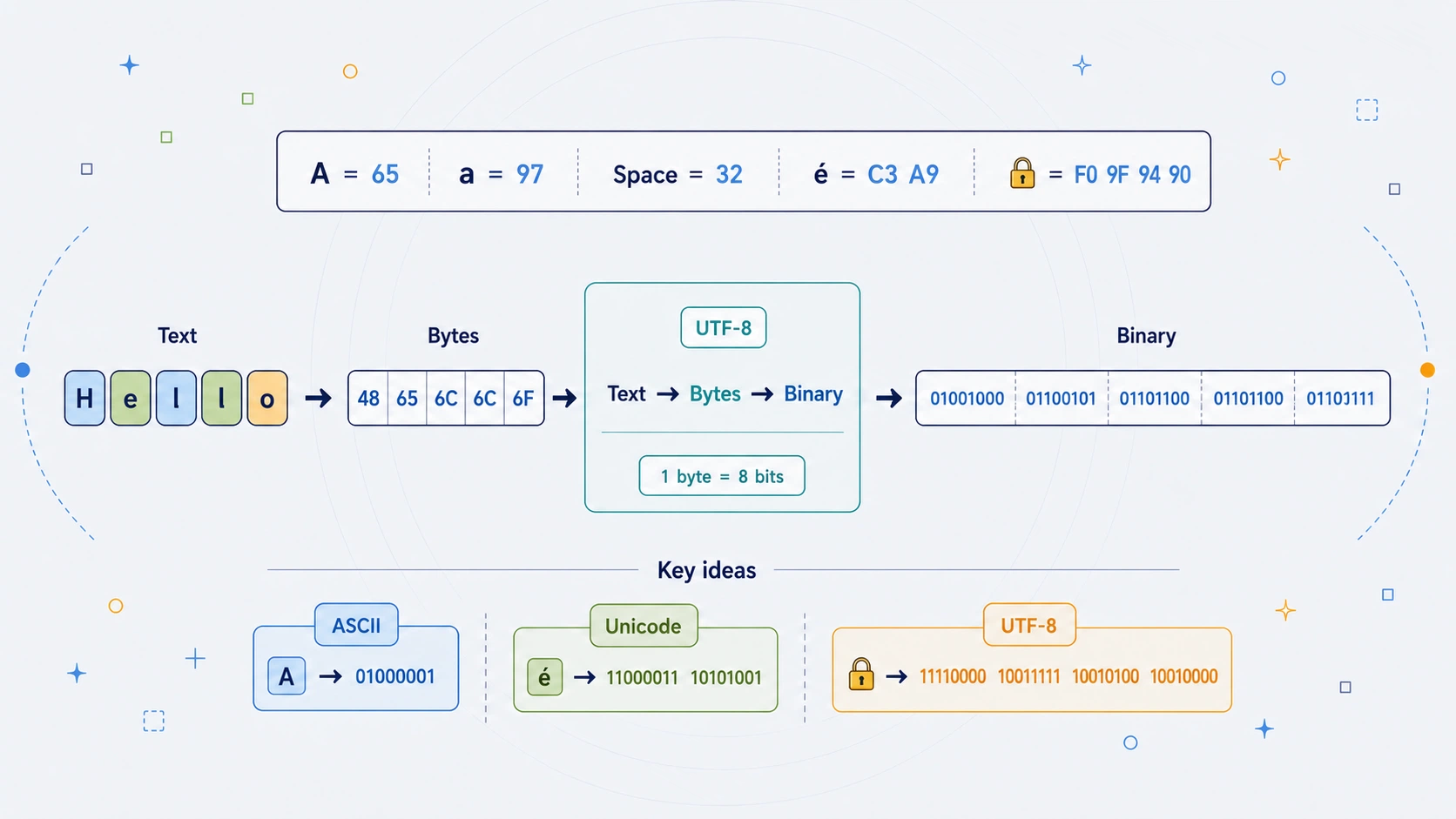
Type the word Hello into a binary translator and you may see:
01001000 01100101 01101100 01101100 01101111
The word has not disappeared. It has changed form: each letter became a byte, and each byte is shown using only 0 and 1.
A binary translator is mainly a tool for seeing representation. Binary gives a number its base-2 form; an encoding such as UTF-8 tells a computer what those bytes mean as text.
For a simple English letter, the route is easy to follow:
| What we see | Decimal value | Hexadecimal byte | Binary byte |
|---|---|---|---|
H |
72 | 48 |
01001000 |
Modern text is broader than English letters. It includes spaces, punctuation, accents, mathematical symbols, non-Latin scripts, invisible marks, and emoji. That is why a useful binary translator needs to explain bytes, Unicode, and UTF-8 as well as zeroes and ones.
Binary Translator at a Glance
| Feature | Binary Translator |
|---|---|
| Type | Encoding and data representation tool |
| Main idea | Convert text into bytes, then display each byte in binary |
| Number system | Binary, or base 2 |
| Common group size | 8 bits per byte |
| Typical modern encoding | UTF-8 |
| ASCII range | 0 to 127 |
| UTF-8 width | 1 to 4 bytes per Unicode code point |
| Example | A becomes 01000001 |
| Reverse operation | Group bits into bytes, then decode bytes as text |
| Best use | Learning bytes, Unicode, UTF-8, and data representation |
Text -> encoding -> bytes -> binary display
Binary display -> bytes -> decoding -> text
One Character, Several Views
The same underlying byte can be written in several ways. Only its display changes.
| Form | Representation of A |
|---|---|
| Character | A |
| Decimal | 65 |
| Hexadecimal | 41 |
| Binary | 01000001 |
This is why binary translation is not encryption. No secret has been added. The data is simply being shown in a different notation.
Binary Is a Number System
Humans usually count in decimal, or base 10. Binary is base 2, so every position represents a power of two.
$$ 72 = 64 + 8 = 2^6 + 2^3 $$
For an eight-bit byte, the positions have these values:
| Bit position | 2^7 |
2^6 |
2^5 |
2^4 |
2^3 |
2^2 |
2^1 |
2^0 |
|---|---|---|---|---|---|---|---|---|
| Place value | 128 | 64 | 32 | 16 | 8 | 4 | 2 | 1 |
01001000 |
0 | 1 | 0 | 0 | 1 | 0 | 0 | 0 |
Only the 64 and 8 positions are switched on, so 01001000 is decimal 72. It becomes H only when ASCII or UTF-8 assigns that byte value to the letter.
Binary gives the number. An encoding gives the number meaning.
Bits and Bytes
A bit is one binary digit: 0 or 1. A byte is normally eight bits.
$$ 2^8 = 256 $$
That gives 256 possible byte patterns, from 00000000 to 11111111.
| Binary | Decimal | Common use |
|---|---|---|
00000000 |
0 | Null byte |
00100000 |
32 | Space in ASCII / UTF-8 |
01000001 |
65 | A |
01111111 |
127 | Highest standard ASCII value |
11111111 |
255 | A byte value, but not standalone UTF-8 text |
Leading zeroes matter when data is being displayed in bytes. 101 and 00000101 have the same numerical value, but the eight-bit version preserves the byte boundary.
ASCII: A Small Text-to-Number Agreement
ASCII assigns values to English letters, digits, punctuation, spaces, and control characters. Standard ASCII uses values from 0 to 127, which fits in seven bits. Computers usually show those values as full eight-bit bytes.
| Character | Decimal | Hex | 8-bit binary |
|---|---|---|---|
| Space | 32 | 20 |
00100000 |
0 |
48 | 30 |
00110000 |
A |
65 | 41 |
01000001 |
H |
72 | 48 |
01001000 |
Z |
90 | 5A |
01011010 |
a |
97 | 61 |
01100001 |
z |
122 | 7A |
01111010 |
Uppercase and lowercase letters are distinct bytes:
| Character | Decimal | Binary |
|---|---|---|
A |
65 | 01000001 |
a |
97 | 01100001 |
$$ 97 - 65 = 32 $$
That regular difference is useful for learning basic ASCII, but it should not be treated as a universal rule for every writing system.
Worked Example: HELLO in Binary
HELLO uses five ASCII-compatible UTF-8 bytes.
| Character | Decimal | Hex | Binary |
|---|---|---|---|
H |
72 | 48 |
01001000 |
E |
69 | 45 |
01000101 |
L |
76 | 4C |
01001100 |
L |
76 | 4C |
01001100 |
O |
79 | 4F |
01001111 |
HELLO
01001000 01000101 01001100 01001100 01001111
The repeated L produces the same byte twice. A binary translator does not understand that HELLO is a greeting. It simply encodes each character that appears.
Spaces and Punctuation Are Data
A space may look like nothing, but it is stored as a byte. In ASCII and UTF-8, an ordinary space is decimal 32, or 00100000 in binary.
| Character | Meaning | Decimal | Binary |
|---|---|---|---|
| Space | Word separator | 32 | 00100000 |
! |
Exclamation mark | 33 | 00100001 |
, |
Comma | 44 | 00101100 |
. |
Full stop | 46 | 00101110 |
| Tab | Horizontal tab | 9 | 00001001 |
| Line feed | New line | 10 | 00001010 |
This matters because text spaces and binary separators are different things. In A B, the middle space is data. In 01000001 01000010, the space is usually only a visual separator between byte groups.
Unicode Gives Characters Stable Identities
ASCII is useful but small. Unicode assigns stable identities, called code points, to characters across writing systems and symbol sets. UTF-8 is a common way to encode those identities as bytes.
| Character | Unicode code point | UTF-8 bytes | Binary display |
|---|---|---|---|
A |
U+0041 |
41 |
01000001 |
é |
U+00E9 |
C3 A9 |
11000011 10101001 |
Ω |
U+03A9 |
CE A9 |
11001110 10101001 |
中 |
U+4E2D |
E4 B8 AD |
11100100 10111000 10101101 |
🔐 |
U+1F510 |
F0 9F 94 90 |
11110000 10011111 10010100 10010000 |
A Unicode code point is not a byte. Unicode identifies a character; UTF-8 encodes that character as one or more bytes; binary displays those bytes in base 2.
UTF-8 Uses One to Four Bytes
UTF-8 keeps ordinary ASCII text compact while allowing far more characters when needed.
| Code point range | UTF-8 width | Typical example |
|---|---|---|
U+0000 to U+007F |
1 byte | A |
U+0080 to U+07FF |
2 bytes | é |
U+0800 to U+FFFF |
3 bytes | 中 |
U+10000 to U+10FFFF |
4 bytes | 🔐 |
For é, the full conversion looks like this:
é -> U+00E9 -> C3 A9 -> 11000011 10101001
For the locked-with-key emoji, one visible symbol occupies four UTF-8 bytes:
🔐 -> U+1F510 -> F0 9F 94 90
   -> 11110000 10011111 10010100 10010000
Visible length and byte length are therefore not always the same.
Character, Code Point, Byte, and Glyph
These terms describe different layers of text:
| Term | Meaning |
|---|---|
| Character | An abstract unit of writing |
| Code point | Unicode’s numerical identity for a character |
| Byte | An eight-bit unit of stored data |
| Glyph | The shape a font draws on screen |
| Grapheme cluster | What a reader often perceives as one visible character |
For a simple A, these layers line up neatly. For accented characters and emoji, they can diverge. Two strings can look identical while containing different code points or byte sequences.
Decoding Binary Back into Text
Decoding reverses the route. Start with eight-bit groups, interpret them as bytes, then decode those bytes using the selected encoding.
| Binary | Decimal | Hex | Character |
|---|---|---|---|
01000011 |
67 | 43 |
C |
01101001 |
105 | 69 |
i |
01110000 |
112 | 70 |
p |
01101000 |
104 | 68 |
h |
01100101 |
101 | 65 |
e |
01110010 |
114 | 72 |
r |
01000011 01101001 01110000 01101000 01100101 01110010
Cipher
For ASCII-range text this can look like a direct lookup. UTF-8 decoding can be more involved because several bytes may combine into one character.
Invalid Binary and Invalid UTF-8 Are Different Problems
A good translator should explain the layer that failed instead of giving a vague error.
| Input | What is wrong? | Helpful response |
|---|---|---|
0100100X |
X is not a binary digit |
Reject it as invalid binary |
0100000 |
Only seven bits are present | Explain that a full byte needs eight bits |
11111111 |
Valid byte value, but not valid standalone UTF-8 text | Report invalid UTF-8 |
11000011 |
Starts a two-byte UTF-8 sequence but has no continuation byte | Report an incomplete UTF-8 sequence |
10101001 |
A continuation byte appears on its own | Report malformed UTF-8 |
This is why the Binary Translator tool distinguishes a parsing error from a decoding error.
Leading Zeroes and Separators
Padding and grouping are presentation choices that preserve structure.
| Display | Same byte sequence? | Why it matters |
|---|---|---|
01000001 01000010 01000011 |
Yes | Easy for a person to inspect |
01000001,01000010,01000011 |
Yes | Commas can separate byte groups |
010000010100001001000011 |
Yes | Compact but harder to read |
100000110000101000011 |
Not safely readable as bytes | Missing leading zeroes obscured the boundaries |
Separators must not contain 0 or 1, because those are part of the data itself.
Binary, Hexadecimal, and Base64
The bytes behind Hi can be represented in several useful ways.
| Representation | Output |
|---|---|
| Text | Hi |
| Decimal bytes | 72 105 |
| Hexadecimal | 48 69 |
| Binary | 01001000 01101001 |
| Base64 | SGk= |
Binary is ideal for learning bit structure. Hexadecimal is usually more compact for practical byte inspection, while Base64 is useful for carrying binary data through text-oriented systems.
Where Binary Translation Appears Today
Binary translation is useful in:
- computer science and electronics lessons
- programming and networking tutorials
- Unicode and encoding debugging
- byte inspection and file-format education
- puzzle hunts, geocaching clues, and beginner CTF challenges
- visual explanations of how computers store text
It is also a useful sanity check when text behaves strangely: invisible characters, mixed encodings, and unexpected byte counts become visible instead of mysterious.
A Simple JavaScript Binary Translator
Modern browsers provide TextEncoder for UTF-8 encoding and TextDecoder for UTF-8 decoding. The example below follows the same route as the tool.
JavaScript exampleShow code
const encoder = new TextEncoder();
const decoder = new TextDecoder("utf-8", { fatal: true });

function textToBinary(text) {
    return Array.from(encoder.encode(text), byte =>
        byte.toString(2).padStart(8, "0")
    ).join(" ");
}

function binaryToText(binary) {
    const cleaned = binary.replace(/0b/gi, "").replace(/[\s,]+/g, "");

    if (cleaned.length === 0) {
        return "";
    }

    if (!/^[01]+$/.test(cleaned) || cleaned.length % 8 !== 0) {
        throw new Error("Use complete 8-bit binary byte groups.");
    }

    const bytes = new Uint8Array(
        cleaned.match(/.{8}/g).map(bits => Number.parseInt(bits, 2))
    );

    return decoder.decode(bytes);
}

console.log(textToBinary("Hello"));
console.log(binaryToText("01001000 01101001"));
The important steps are small: encode text into bytes, display each byte in base 2, then reverse that process when decoding.
Common Questions
Is binary translation encryption?
No. Binary translation is encoding or representation. Anyone who knows the byte grouping and character encoding can reverse it.
Why does an emoji produce so much binary?
Many emoji need four UTF-8 bytes, and some visible emoji are made from multiple Unicode code points. More bytes mean more eight-bit binary groups.
Why can two identical-looking characters have different binary?
Unicode can represent some visible text in more than one way, such as a precomposed accented letter or a base letter plus a combining accent. The display can match even when the bytes differ.
Can every binary sequence be decoded as text?
No. A sequence may be valid binary and valid bytes but still be invalid under the chosen text encoding. 11111111 is a byte, for example, but not valid standalone UTF-8 text.
Why Binary Translation Still Matters
Binary should not be mistaken for protection. It does not hide passwords, messages, API keys, or personal data. It is simply a way of writing byte values.
But it remains one of the best ways to understand how text becomes data. It shows that letters, spaces, accents, and emoji all have a representation beneath what we see on screen. Once that representation is visible, concepts such as UTF-8, hexadecimal, Base64, hashing, encryption, and file formats become much easier to understand.