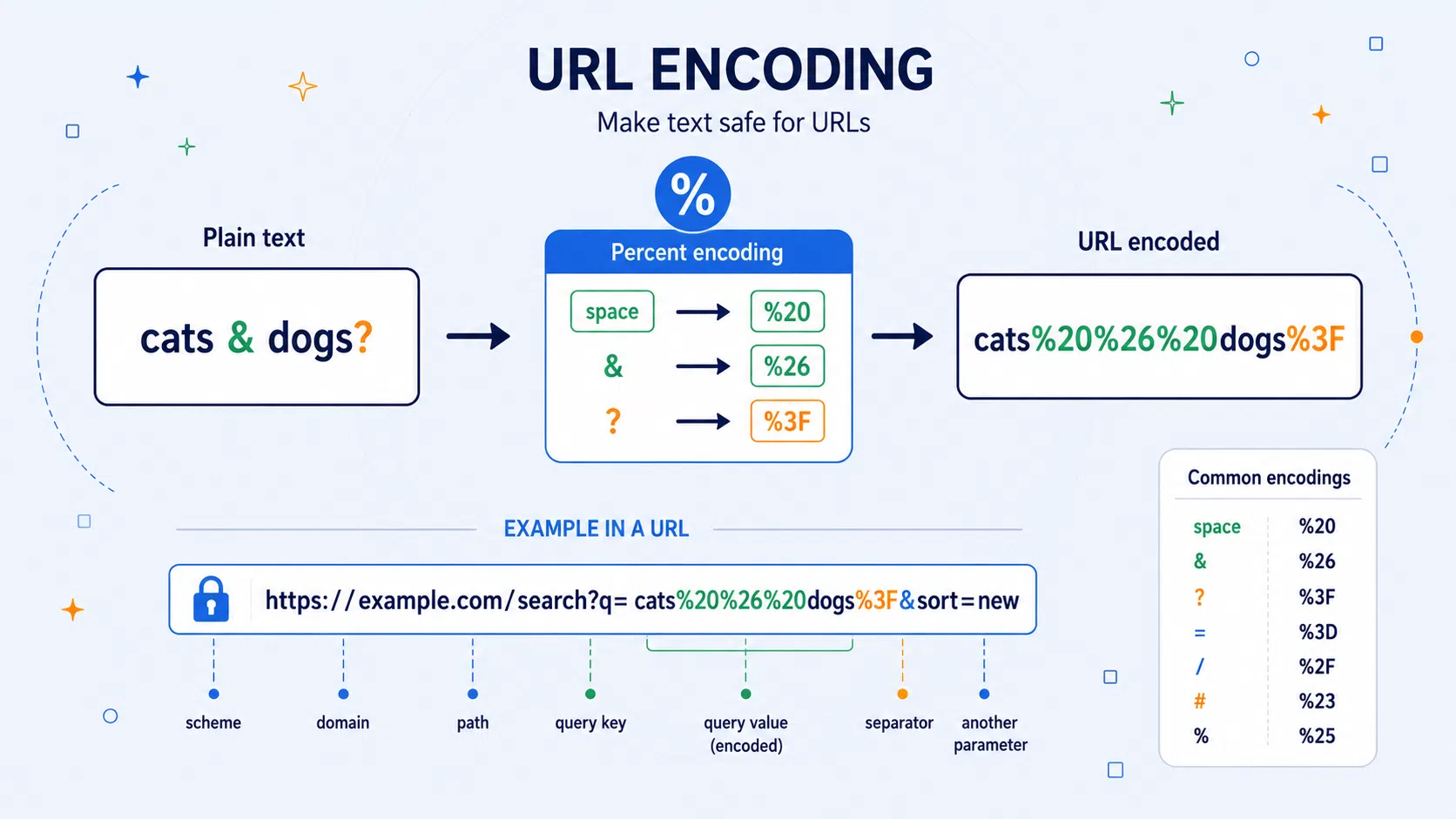
Why spaces become %20, why & turns into %26, and how percent encoding lets ordinary text survive inside web addresses without breaking the structure of a URL.
A URL looks like a simple line of text, but it is really a small structured message. It may contain a scheme such as https, a domain name, a path, a query string, and sometimes a fragment identifier after #. Characters such as /, ?, &, =, and # are not just decorative marks. In the right place, they tell the browser or server where one part of the address ends and another begins.
That creates a problem. What happens when the text you want to place inside a URL contains one of those characters as ordinary data?
Suppose a search box contains:
cats & dogs?
If that phrase is placed directly into a query string, the & and ? may be misunderstood as URL structure. URL encoding solves that problem by replacing reserved, unsafe, or ambiguous characters with percent-coded byte values. The phrase becomes:
cats%20%26%20dogs%3F
The message has not been encrypted. Nothing secret has happened. The text has only been rewritten so URL parsers do not confuse data with structure.
URL encoding is a practical encoding system: it turns human-readable text into a form that can travel safely through web addresses, APIs, forms, redirects, tracking links, and browser tools.
URL Encoding at a Glance
| Feature | URL encoding |
|---|---|
| Also known as | Percent encoding |
| Type | Web/data encoding |
| Main purpose | Makes text safe to include inside URLs |
| Basic rule | Reserved, unsafe, or ambiguous characters become % followed by two hexadecimal digits |
| Example | Space -> %20, & -> %26, ? -> %3F |
| Security level | Not encryption; provides no secrecy |
| Common places | Links, query strings, forms, APIs, redirects, browser address bars |
| Useful for learning | URLs, bytes, hexadecimal, UTF-8, web forms, API parameters |
| Related CipherRegister topics | Hex, Base64, Base32, ASCII, UTF-8, encoding, percent encoding |
The Quiet Problem Inside Every Web Address
A URL has to be both readable by humans and reliably parsed by machines. That is not as easy as it sounds.
Consider this address:
https://example.com/search?q=cats&sort=new
A browser or server reads this as a structured URL:
| Part | Meaning |
|---|---|
https |
Scheme |
example.com |
Host/domain |
/search |
Path |
? |
Starts the query string |
q=cats&sort=new |
Query string |
q=cats |
First query parameter |
sort=new |
Second query parameter |
The characters ?, &, and = have jobs.
| Character | Job in this URL |
|---|---|
? |
Introduces the query string |
& |
Separates query parameters |
= |
Joins a parameter name to a value |
Now imagine the actual search text is:
cats & dogs
If we naively write:
https://example.com/search?q=cats & dogs
the address becomes ambiguous. Is & dogs part of the search phrase, or is it the start of another query parameter?
URL encoding removes the ambiguity:
https://example.com/search?q=cats%20%26%20dogs
Now the & inside the search term is no longer a structural separator. It is data. The %26 tells the URL parser: this is the ampersand character, not a query separator.
This is the core idea of URL encoding: a character may be perfectly valid as URL structure in one place, but unsafe or ambiguous when it appears as ordinary data inside a component.
Percent Signs, Bytes, and Hexadecimal
URL encoding is called percent encoding because each escaped value begins with a percent sign:
%XX
The two X characters are hexadecimal digits. Hexadecimal is base 16, using:
0 1 2 3 4 5 6 7 8 9 A B C D E F
So %20 means hexadecimal 20, which is decimal 32. In ASCII and UTF-8, byte value 32 represents a space.
A few common examples:
| Character | URL-encoded form | Why it may be encoded |
|---|---|---|
| space | %20 |
Spaces are not safely written literally in URLs |
& |
%26 |
Separates query parameters |
? |
%3F |
Introduces a query string in a full URL and may confuse URL structure |
= |
%3D |
Separates query names and values |
/ |
%2F |
Separates path segments |
# |
%23 |
Starts a fragment identifier |
% |
%25 |
Begins a percent-encoded escape |
£ |
%C2%A3 |
Non-ASCII character encoded through UTF-8 bytes |
The official URI syntax describes percent encoding as a triplet: the percent character % followed by two hexadecimal digits representing an octet, which is another word for an 8-bit byte. RFC 3986 also recommends uppercase hexadecimal digits for consistency, so %3F is normally preferred over %3f, even though both represent the same byte value.
The important subtlety is this:
URL encoding usually encodes bytes, not abstract letters.
For plain ASCII characters, that distinction is almost invisible. The character A is byte 41 in hexadecimal. A space is byte 20. But for characters outside basic ASCII, such as £, é, ✓, or 你, the character is first represented as one or more bytes, usually using UTF-8, and then each byte is percent-encoded.
| Character | UTF-8 bytes | URL-encoded form |
|---|---|---|
£ |
C2 A3 |
%C2%A3 |
é |
C3 A9 |
%C3%A9 |
✓ |
E2 9C 93 |
%E2%9C%93 |
你 |
E4 BD A0 |
%E4%BD%A0 |
That is why one visible character may become several %XX groups.
Recognising URL Encoding in the Wild
URL encoding is easy to recognise once you know the pattern.
Look for percent signs followed by two hexadecimal digits:
%20
%2F
%3D
%C2%A3
%E2%9C%93
The general pattern is:
% + two hex digits
Hex digits can be 0-9 and A-F.
These are valid percent escapes:
| Escape | Character or byte |
|---|---|
%20 |
space |
%2F |
/ |
%3A |
: |
%3D |
= |
%26 |
& |
%25 |
% |
Lowercase hex is also commonly seen:
%2f
%3a
%c2%a3
A normal decoder should understand both uppercase and lowercase hex. The uppercase form is often preferred for consistency, but lowercase escapes are not unusual.
You may see URL encoding in browser address bars, copied links from search engines, API request URLs, OAuth redirect URLs, payment links, email tracking links, analytics parameters, map URLs, online forms, CTF challenges, and server logs.
A particularly common clue is %20, which often means someone has copied a URL containing spaces or generated a query value from ordinary text.
A Worked Example: Encoding a Search Phrase
Let's encode this phrase:
black cats & white dogs?
We will use URL component encoding, which is the safest mode for a piece of text that will be placed inside a query value.
| Character or part | Safe as-is? | Encoded form |
|---|---|---|
black |
Yes | black |
| space | No | %20 |
cats |
Yes | cats |
| space | No | %20 |
& |
No, because it can separate query parameters | %26 |
| space | No | %20 |
white |
Yes | white |
| space | No | %20 |
dogs |
Yes | dogs |
? |
Usually encoded in a component because it is a reserved URL character | %3F |
So:
black cats & white dogs?
becomes:
black%20cats%20%26%20white%20dogs%3F
Now it can safely be used inside a URL:
https://example.com/search?q=black%20cats%20%26%20white%20dogs%3F
The server can decode the value of q back to:
black cats & white dogs?
The phrase has survived the journey without its punctuation being mistaken for URL syntax.
The Same Character Can Be Syntax in One Place and Data in Another
URL encoding is easiest to understand once you separate syntax from data.
Take this URL:
https://example.com/search?q=red%20fox%20%26%20blue%20hare&sort=new
There are two ampersands to think about:
| Text | Meaning |
|---|---|
%26 |
A literal & inside the search phrase |
& |
A separator between query parameters |
The decoded search value is:
red fox & blue hare
But the plain & between hare and sort is not part of the search phrase. It separates one parameter from another.
That is the central trick: URL encoding lets the same visible character exist as ordinary data in one place and as URL structure in another.
Encoding a Full URL Is Not the Same as Encoding a URL Component
This is one of the most common sources of confusion.
There are two related but different tasks:
| Task | Example input | Desired behaviour |
|---|---|---|
| Encode a full URL | https://example.com/search?q=black cats |
Keep https://, /, ?, and = as URL structure |
| Encode a URL component | black cats & dogs? |
Encode characters that might interfere with URL structure |
A full URL contains structural characters that must remain readable:
https://example.com/search?q=black cats
If we encode it as a full URL, we want:
https://example.com/search?q=black%20cats
Notice that the colon, slashes, question mark, and equals sign remain:
https://example.com/search?q=
Only the space becomes %20.
But if we encode the whole thing as a component, we get something much more aggressive:
https%3A%2F%2Fexample.com%2Fsearch%3Fq%3Dblack%20cats
That is not wrong if the entire URL is itself being placed inside another URL as a value. For example, a redirect parameter might need this:
https://example.com/redirect?next=https%3A%2F%2Fexample.com%2Fsearch%3Fq%3Dblack%20cats
But it would be wrong if you intended the browser to use it directly as the main address.
In JavaScript, this difference appears in two familiar functions:
| JavaScript function | Best use |
|---|---|
encodeURI() |
Encode an already-formed URL while preserving URL syntax |
encodeURIComponent() |
Encode a single component, such as a query value or path part |
encodeURIComponent() encodes more characters than encodeURI(), including characters that are part of URI syntax, while encodeURI() deliberately leaves many URL-structure characters alone.
That is why a good URL Encoder / Decoder tool should offer both modes.
Decoding: Turning Percent Escapes Back Into Text
Decoding reverses the process.
Given:
black%20cats%20%26%20white%20dogs%3F
the decoder reads each valid percent escape:
| Encoded | Decoded |
|---|---|
%20 |
space |
%26 |
& |
%3F |
? |
So the result becomes:
black cats & white dogs?
For Unicode characters, decoding has two stages:
| Stage | Meaning |
|---|---|
| 1 | Turn each %XX group back into a byte |
| 2 | Interpret the byte sequence as text, usually UTF-8 |
Example:
%C2%A310
First decode the bytes:
| Percent escape or literal | Meaning |
|---|---|
%C2 |
byte C2 |
%A3 |
byte A3 |
1 |
literal 1 |
0 |
literal 0 |
The bytes C2 A3 are the UTF-8 representation of £, so:
%C2%A310
becomes:
£10
Malformed input can be handled differently by different decoders. Some libraries are forgiving, while stricter decoders may fail on a bare %, an incomplete escape such as %2, or invalid UTF-8 byte sequences. For an educational tool, it is better to warn the user when the input appears malformed rather than silently treating every strange case as normal.
The Strange Case of Plus Signs and Spaces
Many people learn that a space becomes %20. Then they see a URL like this:
q=black+cats+and+white+dogs
So does a space become %20, or does it become +?
The answer is: it depends on the context.
In ordinary percent encoding, a space is represented as:
%20
But in application/x-www-form-urlencoded data, the format traditionally used for HTML form submissions and many query strings generated from forms or URL APIs, spaces are often represented as:
+
Written as an example, this means:
| Encoded form | Decoded text |
|---|---|
black%20cats |
black cats |
black+cats |
black cats |
But a literal plus sign also exists as a real character. If the user actually means:
1+1=2
then form-style encoding should protect the plus sign:
1%2B1%3D2
Otherwise, a form-style decoder might mistake + for a space.
This is why a URL Encoder / Decoder tool may offer two related options:
| Option | Meaning |
|---|---|
Encode spaces as + |
Useful for form/query-style component encoding |
Decode + as space |
Useful when decoding query strings copied from URLs |
For teaching purposes, it is useful to show both forms. For most general explanations, %20 is the cleaner starting point. For real query strings and web forms, + is common enough that users need to understand it.
URL Encoding Is Not Encryption
Because URL encoding turns readable text into something uglier, beginners sometimes mistake it for encryption. That is understandable, but incorrect.
| Method | Purpose | Secret? |
|---|---|---|
| URL encoding | Makes text safe inside URLs | No |
| Base64 | Represents binary data as text | No |
| Encryption | Hides information using a key | Yes, if done properly |
URL-encoded text is not protected. Anyone can decode:
secret%20message
back into:
secret message
There is no key. There is no security barrier. A URL decoder is enough.
So it is better to say:
- encode a URL
- decode a URL
- percent-encode a character
- percent-decode a string
rather than:
- encrypt a URL
- decrypt a URL
That distinction matters on an educational cryptography and encoding site. Ciphers, encodings, hashes, and encryption algorithms can all transform data, but they do not have the same purpose.
URL encoding is useful. It is not private.
When URL Encoding Helps and When It Does Not
URL encoding helps when you need to put text safely into a URL. It prevents characters from being misunderstood as URL syntax.
It is useful for:
| Situation | Example |
|---|---|
| Search query values | q=black%20cats%20%26%20dogs |
| Redirect parameters | next=https%3A%2F%2Fexample.com%2Faccount |
| API requests | name=Alice%20Smith |
| Form data | message=Hello+world |
| File names in links | my%20file.pdf |
| International text in URLs | %E2%9C%93 for ✓ |
But URL encoding does not automatically make a URL safe in every security sense.
It does not:
- prove that a URL is trustworthy
- prevent phishing
- stop SQL injection by itself
- stop cross-site scripting by itself
- hide sensitive data
- make query strings private
- validate that a redirect URL is safe
- protect passwords or tokens placed in URLs
This is a common security trap. Encoding is not the same as validation, sanitisation, authorisation, or encryption.
For example, this URL still contains sensitive information:
https://example.com/reset?token=abc123
Encoding the token differently would not make it safe to expose. It would still be visible in browser history, logs, screenshots, analytics tools, and server records.
The right mental model is:
URL encoding is a formatting and transport tool, not a security system.
The 1990s Web Problem Still Inside Modern Links
URL encoding grew out of the early architecture of the World Wide Web and Internet resource identifiers. The idea was not invented as a secret code by one person on a single day. It emerged as part of the need to represent resource locations in a compact, transferable text format.
RFC 1738, published in December 1994 by Tim Berners-Lee, Larry Masinter, and Mark McCahill, specified Uniform Resource Locators and described URL syntax for Internet resources. It says that the use of such objects in the World Wide Web dates from 1990, and it explains the need to encode certain characters when they would otherwise be unsafe or reserved.
That older RFC already identified practical problems that still make sense today. Spaces can disappear or be introduced when text is copied, typeset, or processed. Characters such as <, >, ", #, and % can have special roles or cause confusion. Reserved characters such as /, ?, :, @, =, and & may have special meanings inside URL schemes.
The modern generic URI syntax is defined in RFC 3986, published in January 2005. It gives the now-familiar account of percent-encoded octets and divides characters into reserved and unreserved sets. Reserved characters are used as delimiters; unreserved characters include letters, digits, hyphen, period, underscore, and tilde.
The result is not glamorous, but it is fundamental web plumbing. URL encoding is one of the small mechanisms that allows links to be copied, generated, transmitted, parsed, and reconstructed across many different systems.
A Practical Decoding Example From a Real-Looking URL
Take this URL:
https://example.com/search?q=red%20fox%20%26%20blue%20hare&sort=new
The query string begins after the ?:
q=red%20fox%20%26%20blue%20hare&sort=new
There are two parameters:
| Parameter | Encoded value | Decoded value |
|---|---|---|
q |
red%20fox%20%26%20blue%20hare |
red fox & blue hare |
sort |
new |
new |
Notice the difference between the two ampersands:
| Text | Meaning |
|---|---|
%26 |
A literal & inside the search phrase |
& |
A separator between query parameters |
That is the whole point. URL encoding lets the same character exist as data in one place and syntax in another.
Related Encodings and Ideas
URL encoding belongs in the same broad family as other text-safe representations, but each member of the family solves a different problem.
| Related concept | Connection |
|---|---|
| Hex encoding | URL encoding uses hexadecimal byte values after % |
| ASCII | Early URL syntax was closely tied to US-ASCII-safe characters |
| UTF-8 | Modern non-ASCII characters are usually converted to UTF-8 bytes before percent encoding |
| Base64 | Another way to turn data into text-safe form, often used for binary data |
| Base32 | A more human-friendly base encoding used in places like recovery codes and authenticator secrets |
| Morse code | Another encoding system, but for signalling rather than web addresses |
| Percent encoding | The precise name for the %XX mechanism |
| Query string | The part of a URL where form-style encoding and + spaces often appear |
Natural internal links from this article include the Hex Encoder / Decoder, Base64 Encoder / Decoder, Base32 Encoder / Decoder, and glossary entries for encoding, UTF-8, ASCII, percent encoding, and query strings.
This page also pairs well with any future tools for Unicode code points, Punycode, HTTP query strings, API request builders, or web-safe text conversion.
URL Encoding in Puzzles, CTFs, and Online Investigations
URL encoding appears frequently in programming exercises, capture-the-flag challenges, web security labs, puzzle hunts, ARGs, and online investigations.
It is rarely the whole puzzle by itself. More often, it is one layer of a message. A clue might contain:
meet%20at%20the%20old%20bridge
A beginner might stare at the percent signs, but anyone familiar with URL encoding will quickly decode it as:
meet at the old bridge
In web CTFs, URL encoding can be more subtle. A challenge might involve double encoding, where a percent sign is itself encoded as %25.
For example:
%252F
Decode once:
%2F
Decode twice:
/
This matters because some systems decode input once, while others decode it more than once. RFC 3986 warns that implementations should not percent-encode or decode the same string more than once, because doing so can change how percent signs and escapes are interpreted.
For CipherRegister, the educational value is excellent: URL encoding teaches bytes, hex, parsing, reserved characters, Unicode, and the difference between encoding and encryption through a mechanism people actually encounter.
A Simple Python Implementation
Python already includes URL encoding and decoding tools in its standard library, so a real project should usually use urllib.parse rather than writing its own parser.
Here is a simple example:
Python exampleShow code
from urllib.parse import quote, unquote, quote_plus, unquote_plus


def encode_url_component(text, space_as_plus=False):
    """
    Encode one URL component, such as a query value.

    Use quote() when you want spaces to become %20.
    Use quote_plus() when you want form-style output where spaces become +.
    """

    if space_as_plus:
        return quote_plus(text)

    return quote(text, safe="")


def decode_url_component(text, plus_as_space=True):
    """
    Decode one URL component back to readable text.

    Use unquote_plus() for query/form-style strings where + means space.
    Use unquote() when + should remain a literal plus sign.
    """

    if plus_as_space:
        return unquote_plus(text)

    return unquote(text)


message = "black cats & white dogs? price = £10"

encoded = encode_url_component(message)
form_encoded = encode_url_component(message, space_as_plus=True)
decoded = decode_url_component(encoded)

print("Percent encoded:", encoded)
print("Form encoded   :", form_encoded)
print("Decoded        :", decoded)
Example output:
Percent encoded: black%20cats%20%26%20white%20dogs%3F%20price%20%3D%20%C2%A310
Form encoded   : black+cats+%26+white+dogs%3F+price+%3D+%C2%A310
Decoded        : black cats & white dogs? price = £10
Python's urllib.parse module provides URL parsing and URL quoting functions. Its quote() function replaces special characters with %xx escapes, leaving letters, digits, and the characters '_.-~' unquoted. UTF-8 is the default encoding for non-ASCII string input.
Plain-English Explanation of the Code
The code imports four functions:
| Function | Purpose |
|---|---|
quote() |
Percent-encodes text, using %20 for spaces |
unquote() |
Decodes %XX escapes back to text |
quote_plus() |
Encodes spaces as +, useful for form/query-style text |
unquote_plus() |
Decodes + signs as spaces as well as decoding %XX escapes |
The function:
encode_url_component(text, space_as_plus=False)
takes ordinary text and returns URL-safe text.
If space_as_plus is False, it uses:
quote(text, safe="")
The safe="" part tells Python not to leave / unencoded. That is usually what you want when encoding a single component, because a slash inside user text should not accidentally become a path separator.
If space_as_plus is True, it uses:
quote_plus(text)
That produces form-style output where spaces become +.
The decoding function works the same way in reverse. If plus_as_space is True, then + becomes a space. If it is False, then + remains a literal plus sign.
This is deliberately small code. The point is not to replace the browser or Python's URL libraries. The point is to make the mechanism visible.
In real applications, it is usually better to let a URL library build the query string rather than manually joining strings with ?, &, and =. Manual concatenation is where many encoding mistakes happen: one forgotten %26 can turn part of a value into a new parameter.
A Tiny Manual Version for ASCII Examples
For learning, here is a very small manual encoder for simple text. It is not a complete production URL library, but it shows the basic idea.
Python exampleShow code
def simple_percent_encode(text):
    """
    A tiny teaching version of percent encoding.

    This is not a full URL parser. It only shows the core mechanism:
    keep unreserved URI characters as they are, encode everything else
    as UTF-8 bytes, and write each byte as % followed by two hex digits.
    """

    safe = "ABCDEFGHIJKLMNOPQRSTUVWXYZabcdefghijklmnopqrstuvwxyz0123456789-_.~"
    result = ""

    for char in text:
        if char in safe:
            result += char
            continue

        # Non-ASCII characters may become more than one UTF-8 byte.
        for byte in char.encode("utf-8"):
            result += "%" + format(byte, "02X")

    return result


def show_example(text):
    encoded = simple_percent_encode(text)
    print(f"{text} -> {encoded}")


show_example("HELLO WORLD!")
show_example("£10 & tea")
Output:
HELLO WORLD! -> HELLO%20WORLD%21
£10 & tea -> %C2%A310%20%26%20tea
The function keeps letters, digits, hyphen, underscore, period, and tilde unchanged. Those are the unreserved characters from the modern URI syntax. Everything else is turned into UTF-8 bytes, and each byte becomes % plus two uppercase hexadecimal digits.
This little example also explains why £ becomes %C2%A3: it is one character, but two UTF-8 bytes.
The Real Lesson of URL Encoding
URL encoding is one of those quiet systems that becomes visible only when it goes wrong.
It keeps spaces from breaking links. It lets query strings carry punctuation without confusing the parser. It gives Unicode text a byte-level route through web addresses. It makes redirect URLs, search queries, API parameters, and form submissions work more reliably.
But it does not make information secret. It does not make unsafe input safe in every sense. It does not replace validation, escaping, or encryption.
Its lesson is narrower and more useful:
URLs are structured text, and structured text needs a way to carry literal data without confusing that data for syntax.
That is what percent encoding gives the web.