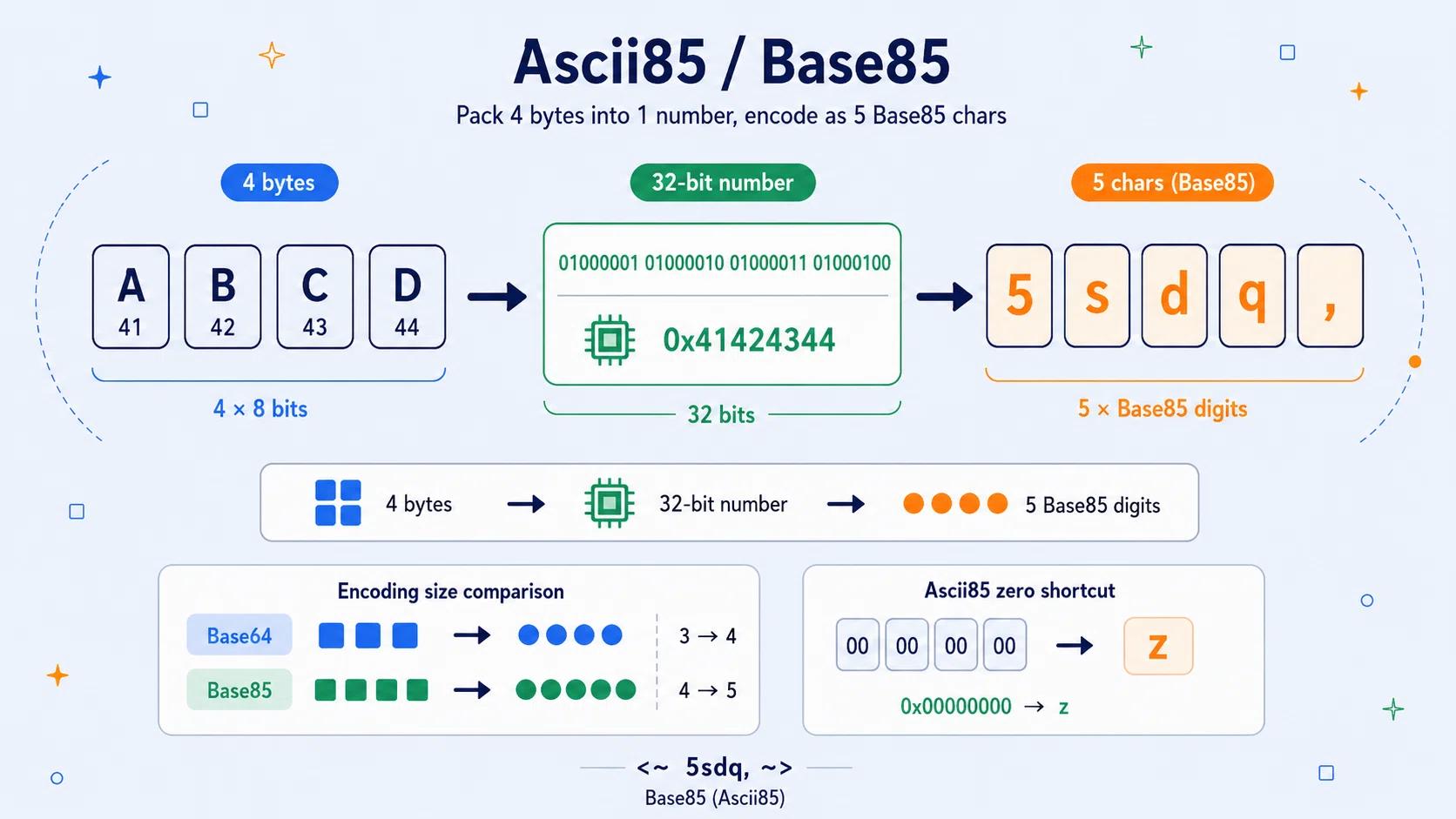
Ascii85 and Base85 are binary-to-text encodings. They take raw bytes - the kind of data found inside files, images, compressed archives, executable data, or UTF-8 text - and rewrite those bytes using printable characters.
They are not ciphers in the modern security sense. They do not use a secret key. They do not encrypt a message. Anyone who recognises the format can decode it.
Their purpose is different: to make binary data survive in places that expect text.
Base64 is the better-known member of this family. It appears in email, data URLs, web APIs, certificates, tokens, and countless programming tasks. Ascii85 and Base85 solve a similar problem, but they do it more compactly. Base64 usually turns every 3 bytes into 4 characters. Ascii85 and Base85 turn every 4 bytes into 5 characters. That gives them about 25% overhead for full blocks, compared with Base64's roughly 33.3% overhead.
The catch is that "Base85" is not one single universal format. Ascii85, Adobe-style Ascii85, btoa-style Ascii85, Git-style Base85, RFC 1924 Base85, and Z85 are related ideas, but they differ in alphabets, wrappers, padding behaviour, and shorthand rules. That is why a good Ascii85 / Base85 encoder and decoder should let you choose the variant rather than pretending they are all identical.
Ascii85 / Base85 at a Glance
| Feature | Ascii85 / Base85 |
|---|---|
| Type | Binary-to-text encoding |
| Main purpose | Represent bytes using printable text characters |
| Core mechanism | 4 bytes become a 32-bit number, then become 5 base-85 digits |
| Common Ascii85 alphabet | ASCII characters ! through u |
| Common non-Ascii85 alphabet | RFC 1924-style / Git-style Base85 alphabet |
| Key | None |
| Encryption? | No |
| Decoding term | Decode, not decrypt |
| Full-block expansion | 4 bytes to 5 characters, about 25% overhead |
| Base64 comparison | Base64 uses 3 bytes to 4 characters, about 33.3% overhead |
| Common Ascii85 wrapper | <~ at the start and ~> at the end in Adobe-style examples |
| Useful shorthand | z can represent four zero bytes in many Ascii85 variants |
| Security level | No secrecy; encoding only |
Ascii85 and Base85 are worth learning because they sit at a useful middle point. They are more mathematical than URL encoding, hex, or A1Z26, but still much easier to inspect than compression, encryption, or binary file formats.
They also teach a practical programming lesson:
Text is not the same thing as bytes.
A string like:
Hello
may look simple, but in a computer it is represented as bytes. In UTF-8, ordinary English letters usually use one byte each:
| Character | Byte value | Hex |
|---|---|---|
| H | 72 | 48 |
| e | 101 | 65 |
| l | 108 | 6c |
| l | 108 | 6c |
| o | 111 | 6f |
Ascii85 does not really encode "letters". It encodes the underlying bytes.
Binary Data in a Text-Shaped World
Many systems were built around text. Early email systems, terminal tools, printers, source files, markup documents, and network protocols often expected data to be represented as printable characters. Arbitrary binary data can contain byte values that do not display cleanly, may be treated as control characters, or may be damaged by systems that wrap lines, strip spaces, or interpret special symbols.
Binary-to-text encoding solves this by turning arbitrary bytes into a restricted set of characters that can be copied, pasted, transmitted, embedded, or stored more safely.
| Encoding | Main idea |
|---|---|
| Hex / Base16 | Each byte becomes two hexadecimal digits |
| Base32 | Bytes become characters from a 32-symbol alphabet |
| Base64 | 3 bytes become 4 printable characters |
| Ascii85 / Base85 | 4 bytes become 5 printable characters |
| URL encoding | Unsafe URL characters become % followed by hex bytes |
Ascii85 and Base85 are more compact than hex and usually more compact than Base64, but they use a larger and sometimes more awkward character set. Hex is long but simple. Base64 is slightly longer than Base85 but widely standardised. Base85 is compact, but variant compatibility matters.
Four Bytes Become One Big Number
The central idea of Base85 is beautifully simple:
- Take 4 bytes.
- Treat them as one 32-bit integer.
- Convert that integer into 5 digits in base 85.
- Turn those 5 digits into printable characters.
Why 4 bytes?
Because 4 bytes contain 32 bits:
4 x 8 = 32
So 4 bytes can represent:
2^32 = 4,294,967,296
different values.
Now ask: how many different values can 5 base-85 digits represent?
85^5 = 4,437,053,125
That is just enough. Five base-85 digits can cover every possible 32-bit block because:
85^5 > 2^32
This is the neat mathematical reason Base85 works. Base64 uses 6-bit groups because 2^6 = 64. Base85 cannot be sliced as cleanly into bits, because 85 is not a power of 2. Instead of splitting the data into equal bit-sized chunks, Base85 treats each 4-byte block as a whole number and performs base conversion.
Encoding ABCD by Hand
Let us encode:
ABCD
In ordinary ASCII / UTF-8, those characters have these byte values:
| Character | Decimal byte | Hex byte |
|---|---|---|
| A | 65 | 41 |
| B | 66 | 42 |
| C | 67 | 43 |
| D | 68 | 44 |
Together, those four bytes form this 32-bit value:
65 x 256^3 + 66 x 256^2 + 67 x 256 + 68
That gives:
1,094,861,636
Now convert that number into five base-85 digits:
20, 82, 67, 80, 11
Ascii85 turns each digit into a printable character by adding 33, because the printable Ascii85 alphabet begins at ASCII code 33, the exclamation mark !.
| Base-85 digit | Add 33 | ASCII code | Character |
|---|---|---|---|
| 20 | 53 | 53 | 5 |
| 82 | 115 | 115 | s |
| 67 | 100 | 100 | d |
| 80 | 113 | 113 | q |
| 11 | 44 | 44 | , |
So:
ABCD
encodes as:
5sdq,
If Adobe-style markers are used, it may be written as:
<~5sdq,~>
Those wrapper symbols are not part of the data itself. They mark the start and end of the Ascii85 string in Adobe-style notation.
Why the Ascii85 Alphabet Runs from ! to u
The common Ascii85 alphabet uses 85 consecutive printable ASCII characters:
! " # $ % & ' ( ) * + , - . / 0 1 2 ... s t u
In codepoint terms, that is ASCII 33 through ASCII 117.
The advantage of this alphabet is mechanical simplicity. To encode a base-85 digit, add 33. To decode an Ascii85 character, subtract 33.
The disadvantage is that some of these characters have special meanings in programming languages, markup, shells, URLs, JSON strings, HTML, XML, and other text formats. Characters such as ", ', <, >, &, \, and / can be awkward depending on where the encoded text is placed.
That is one reason different Base85 variants exist. They are often trying to balance compactness against character safety.
Partial Blocks: What Happens to Hello?
Base85 works naturally on groups of 4 bytes. But real input does not always divide evenly into groups of 4.
Take:
Hello
That is 5 bytes in UTF-8. The first four bytes form a complete block:
H e l l
Ascii85 encodes that block as:
87cUR
The final byte is:
o
A one-byte leftover cannot form a full 32-bit block by itself. The usual Ascii85 method is:
- Pad the final block with zero bytes until it is 4 bytes long.
- Encode the padded 4-byte block into 5 Ascii85 characters.
- Keep only enough encoded characters to represent the original leftover data.
| Leftover bytes | Encoded characters kept |
|---|---|
| 1 byte | 2 characters |
| 2 bytes | 3 characters |
| 3 bytes | 4 characters |
| 4 bytes | 5 characters |
So Hello becomes:
87cURDZ
With Adobe-style markers:
<~87cURDZ~>
Reading the Five Characters Backward
Decoding reverses the process.
Suppose we receive:
5sdq,
Ascii85 decoding subtracts 33 from each character's ASCII code:
| Character | ASCII code | Minus 33 | Base-85 digit |
|---|---|---|---|
| 5 | 53 | 20 | 20 |
| s | 115 | 82 | 82 |
| d | 100 | 67 | 67 |
| q | 113 | 80 | 80 |
| , | 44 | 11 | 11 |
Now rebuild the number:
20 x 85^4 + 82 x 85^3 + 67 x 85^2 + 80 x 85 + 11
That gives:
1,094,861,636
Then split that number back into four bytes:
| Byte | Decimal | Character |
|---|---|---|
| First | 65 | A |
| Second | 66 | B |
| Third | 67 | C |
| Fourth | 68 | D |
So:
5sdq,
decodes to:
ABCD
This is why Base85 is not encryption. Nothing secret has happened. The data has merely been rewritten in a different base.
The z Shortcut for Four Zero Bytes
Ascii85 has a famous shorthand:
z
In many Ascii85 variants, the single character z means:
00 00 00 00
or four zero bytes.
Without the shorthand, four zero bytes would encode as:
!!!!!
The shorthand compresses this common block to:
z
However, z has a rule: it must represent a complete 4-byte zero block. It cannot appear halfway through a group. A strict decoder should reject misplaced z rather than guessing.
The Older y Shortcut for Four Spaces
Some btoa-style Ascii85 variants also support another shorthand:
y
This represents four space characters:
20 20 20 20
in hexadecimal.
That is useful in old text-heavy contexts where runs of spaces might appear often. But it is not universally supported. The same detail makes Base85 slightly treacherous: two strings may both look like "Ascii85", but one decoder may accept y while another rejects it.
A careful tool should make this option explicit.
Adobe Markers: <~ and ~>
Many Ascii85 examples are wrapped like this:
<~87cURDZ~>
The opening marker is:
<~
The closing marker is:
~>
These are commonly associated with Adobe-style Ascii85 notation. They are useful because they clearly show where the encoded text begins and ends.
The markers are not part of the original data. They are framing punctuation. Some contexts expect markers, some make them optional, and some forbid them.
Base85 Is a Family, Not One Format
The name "Base85" can cause confusion because it is used in both a general and a specific sense.
In the general sense, Base85 means:
Any encoding that uses 85 printable symbols to represent binary data compactly.
In the specific sense, a library may use "Base85" to mean a particular alphabet and padding convention.
Python's base64 module is a good illustration:
| Python function | Meaning |
|---|---|
a85encode() / a85decode() |
Ascii85 |
b85encode() / b85decode() |
Git-style Base85 |
z85encode() / z85decode() |
Z85, associated with ZeroMQ |
So if one Base85 decoder rejects another tool's output, the likely problem is not that the data is "wrong". It may simply be the wrong Base85 variant.
The RFC 1924 Alphabet
A particularly important Base85 alphabet appears in RFC 1924, A Compact Representation of IPv6 Addresses, published on 1 April 1996 by Robert Elz of the University of Melbourne. The RFC describes a way to represent a 128-bit IPv6 address in 20 base-85 characters and explicitly states that it is informational, not an Internet standard.
The RFC 1924 alphabet is:
0123456789ABCDEFGHIJKLMNOPQRSTUVWXYZabcdefghijklmnopqrstuvwxyz!#$%&()*+-;<=>?@^_`{|}~
It deliberately omits certain awkward characters, including quotes, comma, period, slash, colon, square brackets, and backslash. Git-style Base85 and Python's b85encode() are associated with this style of alphabet.
| Mode | Alphabet style | Wrappers | z shorthand |
|---|---|---|---|
| Ascii85 | ASCII ! through u |
Optional <~ ~> |
Commonly supported |
| Base85 / Git-style | RFC 1924-style alphabet | No Adobe wrappers | Usually not used |
| Z85 | ZeroMQ-style alphabet | No Adobe wrappers | Not used in the same way |
The shared idea is always the same: encode 4 bytes as 5 printable characters. The differences are in the alphabet and surrounding rules.
Ascii85, Base85, and Base64 Compared
Base64 is more widely recognised than Ascii85. It is also more standardised for internet use. But Base85 is denser.
| Encoding | Input block | Output block | Approx. overhead |
|---|---|---|---|
| Hex / Base16 | 1 byte | 2 chars | 100% |
| Base64 | 3 bytes | 4 chars | 33.3% |
| Ascii85 / Base85 | 4 bytes | 5 chars | 25% |
Take the phrase:
Hello, world!
Ascii85 with Adobe markers:
<~87cURD_*#TDfTZ)+T~>
Ascii85 without markers:
87cURD_*#TDfTZ)+T
Base85 using the RFC 1924 / Git-style alphabet:
NM&qnZ!92pZ*pv8Ap
Base64:
SGVsbG8sIHdvcmxkIQ==
Across larger binary data, Base85's 4-to-5 packing is usually more compact than Base64's 3-to-4 packing. The trade-off is that Base85 uses more punctuation, which can make it less convenient in URLs, HTML, JSON, shell commands, source strings, and configuration files.
Base64 is often more boring. That is one reason it is so useful.
Recognising Ascii85 and Base85 Text
Ascii85 and Base85 output often looks like dense punctuation-heavy text:
87cURD_*#TDfTZ)+T
or:
NM&qnZ!92pZ*pv8Ap
Some clues suggest Ascii85:
| Clue | Meaning |
|---|---|
Starts with <~ and ends with ~> |
Likely Adobe-style Ascii85 |
| Contains many punctuation characters | Possible Base85 / Ascii85 |
Contains z as a standalone-looking character |
Could be Ascii85 zero-block shorthand |
Uses characters in the range ! to u |
Consistent with Ascii85 |
| Length is near 5/4 of binary size | Consistent with Base85-style packing |
Recognition is not always certain from appearance alone. Encoded text can be short, wrapped, embedded, escaped, truncated, or mixed with surrounding syntax.
The safest method is to try the correct decoder and check whether the result makes sense as bytes or UTF-8 text.
Decoding Errors and Format Clues
A good Ascii85 / Base85 decoder should complain clearly when the input is not valid.
| Problem | Example |
|---|---|
| Wrong alphabet | Trying to decode RFC 1924 Base85 as Ascii85 |
| Broken Adobe wrapper | Starts with <~ but does not end with ~> |
| Invalid character | A character outside the variant's alphabet |
Misplaced z |
z appears inside a partial group |
Unsupported y shorthand |
Input uses y, but the decoder does not allow it |
| Single leftover character | One final Base85 digit cannot represent a byte in a strict decoder |
| Bad 5-character group | The decoded number is larger than a 32-bit block |
The single leftover character rule is worth highlighting. In Base85, a complete group has 5 characters and decodes to 4 bytes. A final group of 2, 3, or 4 characters can represent 1, 2, or 3 leftover bytes. But a final group of only 1 character does not carry enough information to recover even one original byte.
Base85 Is Not Encryption
Because online tools sometimes use labels like "Base85 decrypt" or "Ascii85 decrypt", it is worth being precise.
Ascii85 does not encrypt. Base85 does not encrypt. They encode.
| Process | Uses a secret key? | Hides meaning from someone who knows the method? | Example |
|---|---|---|---|
| Encoding | No | No | Base64, Base85, hex, URL encoding |
| Encryption | Yes | Yes, if properly designed and keyed | AES-GCM, ChaCha20-Poly1305 |
| Hashing | No, but one-way | Not reversible | SHA-256 |
| Compression | No | Not intended for secrecy | ZIP, gzip |
If you encode:
SECRET MESSAGE
into Ascii85, anyone can decode it. You have not protected the message. You have only changed its representation.
Do not use Base85 to protect passwords, API keys, personal messages, private documents, recovery phrases, financial data, or authentication tokens.
A Full Encode/Decode Example
Let us encode:
Hello, world!
Using Adobe-style Ascii85, the output is:
<~87cURD_*#TDfTZ)+T~>
Without the Adobe markers, the body is:
87cURD_*#TDfTZ)+T
Now decode it. The decoder removes the wrapper, reads the Base85 characters in groups, turns each group back into bytes, and interprets the recovered bytes as UTF-8 text:
Hello, world!
Now encode the same phrase with RFC 1924 / Git-style Base85:
NM&qnZ!92pZ*pv8Ap
This is not the same output, even though the input is the same. That does not mean one is more correct. It means the alphabet and variant are different.
Python: Using the Built-In Ascii85 and Base85 Functions
Python already includes Ascii85 and Base85 support in its standard base64 module. That is the best starting point for real code.
import base64


message = "Hello, world!"
data = message.encode("utf-8")

ascii85 = base64.a85encode(data, adobe=True)
base85 = base64.b85encode(data)

print("Original text:", message)
print("Ascii85:", ascii85.decode("ascii"))
print("Base85 :", base85.decode("ascii"))

decoded_ascii85 = base64.a85decode(ascii85, adobe=True)
decoded_base85 = base64.b85decode(base85)

print("Decoded Ascii85:", decoded_ascii85.decode("utf-8"))
print("Decoded Base85 :", decoded_base85.decode("utf-8"))
Expected output:
Original text: Hello, world!
Ascii85: <~87cURD_*#TDfTZ)+T~>
Base85 : NM&qnZ!92pZ*pv8Ap
Decoded Ascii85: Hello, world!
Decoded Base85 : Hello, world!
This example shows the most important practical point:
Ascii85 and Base85 can encode the same data but produce different text.
The bytes are the same. The variant is different.
A Small Manual Ascii85 Encoder in Python
The built-in Python functions are best for real use, but a short manual encoder helps show how the mechanism works.
Python exampleShow code
def ascii85_encode(data):
    alphabet = ''.join(chr(i) for i in range(33, 118))
    output = []

    for i in range(0, len(data), 4):
        block = data[i:i + 4]
        original_length = len(block)

        if original_length < 4:
            block = block + b'\0' * (4 - original_length)

        value = int.from_bytes(block, byteorder="big")

        if value == 0 and original_length == 4:
            output.append("z")
            continue

        digits = []

        for _ in range(5):
            digits.append(value % 85)
            value //= 85

        digits.reverse()

        encoded = ''.join(alphabet[digit] for digit in digits)

        if original_length < 4:
            encoded = encoded[:original_length + 1]

        output.append(encoded)

    return ''.join(output)


text = "ABCD"
encoded = ascii85_encode(text.encode("utf-8"))

print(encoded)
Expected output:
5sdq,
This is deliberately simple. It shows the mechanism rather than trying to be a full replacement for Python's standard library.
Puzzles, ARGs, CTFs, and Programming Challenges
Ascii85 and Base85 are not as visually famous as Morse code, binary, Caesar cipher, pigpen, or A1Z26. They are less likely to appear in casual puzzle books because the output looks dense and unfriendly.
But they do appear in technical puzzle environments:
- capture-the-flag challenges
- programming puzzles
- file-format exercises
- ARG clue chains
- escape-room style digital puzzles
- geocaching mystery caches
- "decode this string" challenges
- steganography or binary-analysis tasks
In those settings, Ascii85 is often one step in a longer chain:
Base85 -> gzip -> plaintext
or:
Ascii85 -> hex -> XOR -> message
For puzzle solving, the important habit is not memorising every alphabet. It is learning to recognise layers of representation.
Ascii85 is one of those layers.
Common Questions About Ascii85 and Base85
Is Ascii85 the same as Base85?
Not exactly. Ascii85 is a type of Base85. It usually refers to the Adobe/btoa-style alphabet using ASCII characters ! through u.
Base85 is the broader family name. It may refer to Ascii85, RFC 1924-style Base85, Git-style Base85, Z85, or another related variant.
Is Base85 better than Base64?
It depends what "better" means.
Base85 is more compact for full blocks: 4 bytes become 5 characters. Base64 uses 3 bytes to 4 characters.
But Base64 is more widely standardised and often safer in common text contexts. Base85 uses more punctuation, which can be inconvenient in markup, strings, URLs, shells, and configuration files.
Why does Ascii85 sometimes start with <~?
That is an Adobe-style wrapper. It marks the beginning of an Ascii85 string with <~ and the end with ~>.
The wrapper is not part of the underlying byte data. It is framing.
What does z mean in Ascii85?
z is shorthand for four zero bytes:
00 00 00 00
It is a compression shortcut for a complete all-zero 4-byte block. It should not appear in the middle of a group.
What does y mean in Ascii85?
In btoa-style Ascii85, y can mean four spaces:
20 20 20 20
But it is not part of every Ascii85 form. Many decoders reject it unless explicitly configured to allow it.
Can Ascii85 encode Unicode text?
Yes, but it encodes the bytes, not abstract characters.
For example, the character é may be represented by more than one byte in UTF-8. Ascii85 encodes those UTF-8 bytes. When decoding, the bytes must then be interpreted using the correct character encoding.
For modern web tools, UTF-8 is the sensible default.
The Real Lesson of Ascii85 and Base85
Ascii85 and Base85 are not glamorous cryptography. They do not protect secrets. They do not resist attackers. They do not belong in the same security category as AES, ChaCha20-Poly1305, RSA, elliptic-curve cryptography, or modern authenticated encryption.
But they teach something essential.
They show how computers move between:
- bytes
- numbers
- alphabets
- printable text
- file formats
- transport-safe representations
They also reveal a practical truth about computing: many "mysterious strings" are not mysterious at all. They are ordinary bytes wearing a text costume.
Base85 is a particularly efficient costume. It packs 4 bytes into 5 characters. It uses a large alphabet. It has variants, shortcuts, wrappers, and compatibility traps. It is compact enough to be useful and structured enough to be educational.
If Base64 is the everyday workhorse of binary-to-text encoding, Ascii85 is its denser, sharper-edged cousin.
Useful, clever, but slightly less forgiving.
Continue with the Ascii85 / Base85 Encoder / Decoder Tool
Use the matching Ascii85 / Base85 Encoder / Decoder tool to experiment with your own examples.
Try:
Hello, world!
Then compare the output in:
- Ascii85 with Adobe markers
- Ascii85 without markers
- Base85 / RFC 1924-style alphabet
- decoded UTF-8 text
- decoded hex bytes
Then try byte-oriented examples such as:
00 00 00 00
or:
41 42 43 44
The first shows the z shorthand in Ascii85. The second shows why ABCD becomes:
5sdq,
Once you understand that one example, the whole method becomes much less mysterious: Ascii85 is just binary data treated as numbers, then rewritten in a compact printable alphabet.