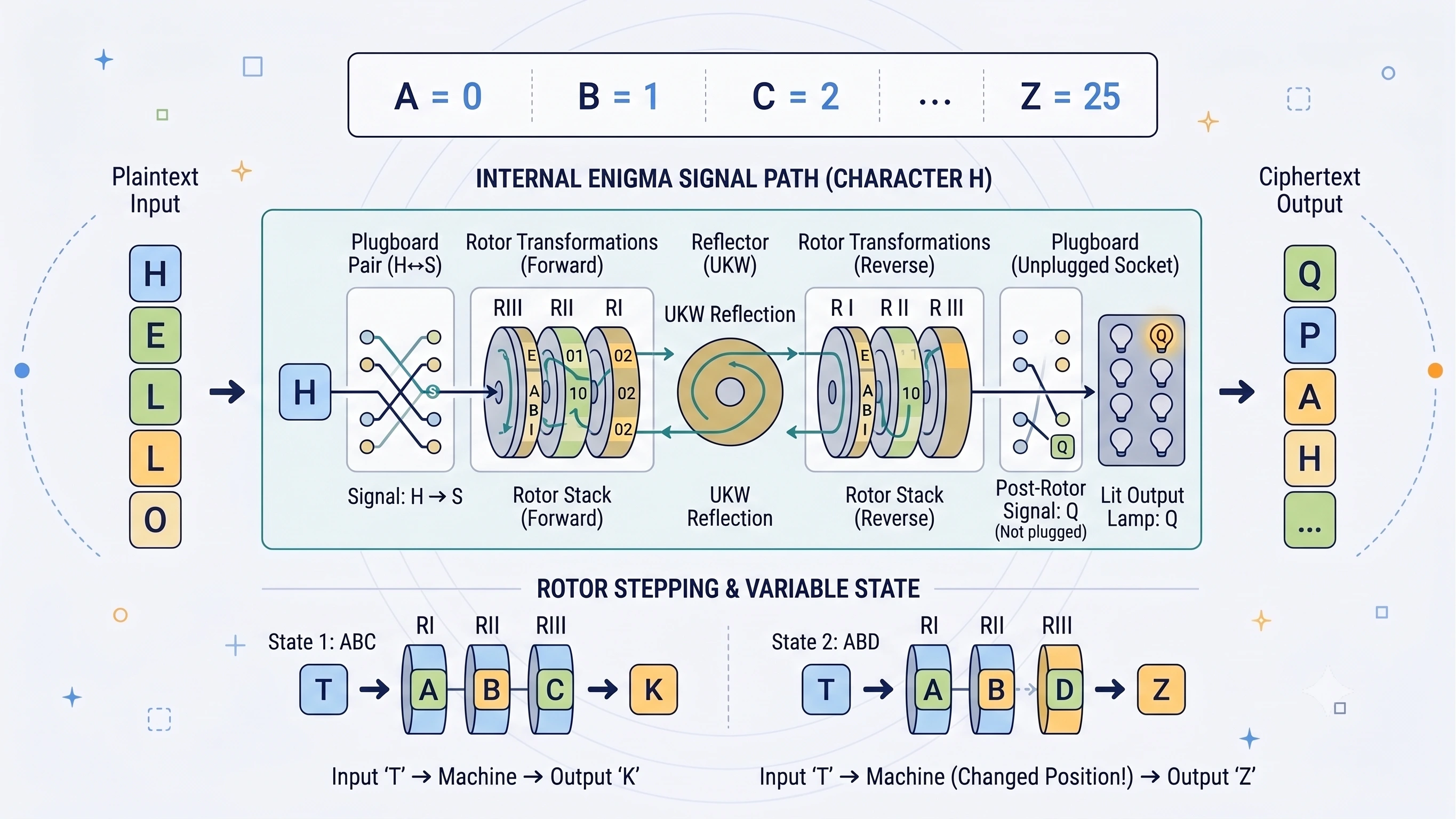
The CipherRegister Enigma Machine Simulator recreates the principal military Enigma arrangements directly in your browser. It supports the three-rotor Enigma I, naval M3, four-wheel naval M4, and a configurable Research mode for experimenting with custom wirings and stepping systems.
Use this guide when you want to encipher a message, reproduce a known machine key, reverse ciphertext, understand an unfamiliar control, or inspect what happens inside the machine one keypress at a time.
All processing takes place locally in your browser. The simulator does not need to send your message elsewhere to transform it.
What You Can Do with the Simulator
The simulator lets you:
- encipher a message using authentic rotor-machine principles;
- decipher a message when you know its complete machine key;
- compare Enigma I, naval M3, and naval M4;
- explore how rotor order, rings, starting windows, reflectors, and the plugboard change the result;
- watch the keyboard, lampboard, and rotor windows respond;
- inspect the electrical route taken by the latest processed letter;
- generate random valid configurations;
- copy a complete key sheet for later use; and
- experiment with custom rotors, reflectors, entry wheels, notches, and stepping systems.
The tool is an educational reconstruction. It is excellent for learning, demonstrations, interoperability checks, and puzzles, but it does not provide modern cryptographic security.
Quick Start: Encipher Your First Message
Use the standard known-answer configuration:
| Setting | Value |
|---|---|
| Machine | Enigma I |
| Rotors, left to right | I–II–III |
| Ring settings | AAA |
| Starting windows | AAA |
| Reflector | B |
| Plugboard | None |
| Non-letters | Remove |
Then:
- Select Encipher.
- Enter
HELLOWORLDin the plaintext input. - Read the ciphertext output.
HELLOWORLD -> ILBDAAMTAZ
The Load test vector button configures this example automatically.
Reverse the Test
To decipher the result:
- Keep exactly the same machine configuration.
- Return the starting windows to
AAA. - Select Decipher.
- Enter
ILBDAAMTAZ.
ILBDAAMTAZ -> HELLOWORLD
Enigma is reciprocal: the same valid key performs both transformations. The original starting windows must be restored before the ciphertext is processed.
Do not decipher from the ending rotor windows shown after encipherment. End windows describe where the first run finished; they are not the start of the reverse run.
The Idea Behind the Machine
Enigma does not use one fixed substitution. For every processed letter:
- One or more rotors step.
- The input passes through the plugboard.
- It enters the right rotor and travels through the moving rotor stack.
- The reflector turns the signal back.
- The signal returns through the inverse rotor paths.
- It passes through the plugboard again.
- A different letter illuminates on the lampboard.
The ordinary three-rotor route is:
Keyboard
  -> Plugboard
  -> Entry wheel
  -> Right rotor
  -> Middle rotor
  -> Left rotor
  -> Reflector
  -> Left rotor, reverse
  -> Middle rotor, reverse
  -> Right rotor, reverse
  -> Entry wheel
  -> Plugboard
  -> Lampboard
Because stepping happens before the electrical transformation, the substitution changes continually. Under the standard test configuration:
AAAAA -> BDZGO
The repeated input letter does not produce a repeated output.
Finding Your Way Around the Tool
The simulator is divided into these working areas:
| Area | What it controls or displays |
|---|---|
| Operation | Encipher or Decipher labels and workflow |
| Machine model | Enigma I, naval M3, naval M4, or Research |
| Rotor stack | Rotor choice, order, rings, starts, reflector, and M4 Greek wheel |
| Plugboard | Reciprocal cable pairs |
| Text and display options | Non-letter treatment, grouping, and trace visibility |
| Interactive machine | Rotor windows, QWERTZ keyboard, and lampboard |
| Input and output | The message, result, counts, and end windows |
| Signal trace | Route followed by the latest processed letter |
| Current key sheet | Reproducible starting configuration |
| Machine properties | Active stepping, notches, rotor count, and mode |
You can begin with the quick-start vector and learn the remaining controls one group at a time.
Encipher and Decipher Modes
The two operation modes mainly change the interface labels.
| Encipher mode | Decipher mode |
|---|---|
| Plaintext Input | Ciphertext Input |
| Ciphertext Output | Plaintext Output |
The underlying transformation is the same in both directions. If one complete machine key produces:
HELLOWORLD -> ILBDAAMTAZ
then the same key, restarted from the same windows, produces:
ILBDAAMTAZ -> HELLOWORLD
Separate modes make the intended workflow easier to follow; they do not create two different cipher algorithms.
Choosing a Machine Model
The model controls the available component library and the structure of the rotor stack.
| Model | Moving rotors | Extra wheel | Reflector type | Best for |
|---|---|---|---|---|
| Enigma I | 3 chosen from I–V | None | Full-width | Beginners and common three-rotor examples |
| Naval M3 | 3 chosen from I–VIII | None | Compatible full-width | Naval rotor experiments and rotors VI–VIII |
| Naval M4 | 3 chosen from I–VIII | Static Beta or Gamma | Thin | Four-wheel naval configurations |
| Research | 3 moving, optionally plus a static fourth | Configurable | Custom reciprocal wiring | Experimental machines and stepping comparisons |
Enigma I
Enigma I models the familiar three-rotor machine used by the German Army and Luftwaffe. It offers moving rotors I–V and compatible standard reflectors.
Choose it for:
- your first Enigma demonstration;
- the built-in known-answer vectors;
- learning rotor order, ring settings, and double-stepping; or
- recreating a common three-rotor configuration.
Naval M3
Naval M3 remains a three-moving-rotor machine but expands the rotor library to I–VIII. Rotors VI, VII, and VIII have two turnover notches, so they can trigger middle-rotor movement at two positions during a complete rotation.
Choose M3 when studying naval settings, comparing single- and double-notch rotors, or reproducing a three-rotor naval key.
Naval M4
Naval M4 places a stationary Greek wheel to the left of the three moving rotors and uses a compatible thin reflector.
The complete wheel stack is:
Greek wheel | Left rotor | Middle rotor | Right rotor | Thin reflector
Available Greek wheels are Beta and Gamma. The Greek wheel has its own ring setting and starting position, participates in the electrical route, and does not automatically step.
Research Mode
Research mode is not restricted to the historical component library. It supports:
- three moving rotors;
- a static fourth wheel plus three moving rotors;
- custom rotor wirings and turnover notches;
- a custom reciprocal reflector;
- a custom entry wheel; and
- double-step, odometer-style, or static behaviour.
A Research configuration is an experiment unless you have deliberately reproduced a documented machine.
Understanding the Rotor Stack
Rotors are listed from left to right as the operator sees them. The input signal nevertheless enters the right rotor first.
For example:
I–II–III
means:
- rotor I is on the left;
- rotor II is in the middle; and
- rotor III is on the right.
This is not equivalent to III–II–I. Even with the same rings and starting windows, changing the order changes the complete transformation.
Duplicate Rotors Are Invalid
A normal configuration cannot place the same physical rotor in two moving positions. The simulator validates the stack and explains when a duplicate makes the key invalid.
Ring Settings and Starting Windows
Ring settings and starting positions are separate parts of the key.
| Setting | What it changes |
|---|---|
| Ring | Alignment of the alphabet ring relative to internal wiring and turnover behaviour |
| Start | Letter visible in the rotor window before the first keypress |
| Current | Window reached after the complete input has been processed |
Ring Settings
Each rotor has a Ring control. A ring setting changes the relationship between:
- the internal wiring;
- the alphabet ring visible to the operator; and
- the turnover position associated with that rotor.
A ring setting of B shifts that relationship by one position relative to A. It is not simply another way of selecting the visible window letter.
The display can use letters or numbers:
| Letter | Number |
|---|---|
| A | 01 |
| B | 02 |
| C | 03 |
| … | … |
| Z | 26 |
Use Show settings as 01–26 when you are working from a numeric key sheet.
Starting Positions
The Start control specifies the window visible before processing begins.
Start windows: KCH
means that the left rotor begins at K, the middle at C, and the right at H.
These two keys are different:
Rings AAA, Start BBB
Rings BBB, Start AAA
They change different mechanical relationships and do not produce the same output.
Start and Current Displays
The interactive machine shows both:
- Start — the configured initial windows; and
- Current — the windows reached after processing the entire input.
The simulator recalculates from the configured start whenever the text or a machine setting changes. Editing or deleting input therefore moves the displayed end state appropriately without permanently consuming the start key.
Adjusting Windows on the Machine
Each visible rotor has controls above and below its window:
- the upper control moves the starting setting backward;
- the lower control moves it forward.
Changing a window recalculates the complete input from the newly selected start. In M4, the Greek wheel has its own controls.
Selecting a Reflector
The reflector turns the signal back through the rotors. It helps make the standard machine reciprocal and prevents a letter from enciphering to itself.
The available choices depend on the model:
- Enigma I and M3 use compatible full-width reflectors;
- M4 uses a thin reflector; and
- Research mode accepts a validated custom reflector.
Sender and recipient must choose the same reflector. One incorrect reflector makes the output unreadable even when the rest of the key is correct.
Configuring the Plugboard
The plugboard, or Steckerbrett, swaps selected pairs before and after the rotor stage.
AV
means that A enters the rotor system as V, while V enters as A. The same reciprocal exchange is applied on the return route.
Enter Pairs as Text
Separate two-letter cables with spaces:
AV BS CG DL FU HZ IN KM OW RX
Valid shorter examples include:
AB CD EF
AQ WS ED RF TG
Invalid forms include:
| Entry | Why it is invalid |
|---|---|
AA |
A letter cannot connect to itself |
AB AC |
A letter cannot belong to two cables |
ABC |
A cable must contain exactly two letters |
The validation message identifies malformed or conflicting pairs.
Use the Interactive Sockets
You can also build the plugboard visually:
- Click one unused letter.
- Click a second unused letter.
- The simulator connects the two sockets.
Click a paired socket or its pair chip to remove the cable.
The tool permits zero to thirteen pairs. Thirteen is the mathematical maximum for 26 letters; Random key creates a conventional ten-pair arrangement.
Text and Display Options
Non-letter handling determines which visible characters reach the machine and which ones cause rotor steps.
| Mode | Letters | Spaces and punctuation | Rotor effect |
|---|---|---|---|
| Preserve without stepping | Enciphered | Kept visibly | Non-letters do not step |
| Remove | Enciphered | Deleted | Removed characters do not step |
| Encode spaces as X | Enciphered | Whitespace becomes X; other non-letters are omitted |
Each substituted X steps |
Preserve without Stepping
With this option:
MEET AT 8.
keeps its spaces, number, and full stop in the visible output, but only the letters enter the machine. This is useful for readability, though it is not a strict historical message format.
Remove
With Remove, the same input is processed as:
MEETAT
This is the cleanest choice for known-answer tests and classical ciphertext groups.
Encode Spaces as X
With this option:
MEET AT DAWN
is processed as:
MEETXATXDAWN
The separator X itself is enciphered, so it will not normally remain visible as X in the result.
Group the Output
Enable Group output to display equal blocks:
ILBDA AMTAZ
The group size can be set from 2 to 12. Grouping:
- uses uppercase letters;
- removes visible punctuation and whitespace from the displayed result;
- does not insert new characters into the cipher; and
- does not cause additional rotor steps.
Grouping is presentation only.
Interactive Keyboard and Lampboard
The simulator uses the historical German QWERTZ arrangement. Add text by typing in the input area or clicking the interactive keyboard.
For a single letter:
- The input key briefly appears depressed.
- The rotors step and the machine processes the letter.
- The output lamp illuminates.
- The current rotor windows update.
The lower board is the keyboard; the upper board is the lampboard. If you press A and lamp B lights, the machine transformed A to B at that specific stepped state.
When a passage is pasted, the entire message is processed but only its final input and output letters are animated. This avoids a rapid sequence of flashes.
How to Encipher a Message
1. Select the Model
Choose Enigma I, naval M3, naval M4, or Research. Both parties need the same model.
2. Choose the Rotor Order
Select the physical rotor in each moving position:
Left V
Middle II
Right IV
Record that order as:
V–II–IV
For M4, also select Beta or Gamma.
3. Enter the Ring Settings
Set every moving rotor ring:
Left B
Middle L
Right A
Include the Greek ring when using M4.
4. Enter the Starting Windows
Choose the initial visible positions:
Left K
Middle C
Right H
Include the Greek start when using M4.
5. Select the Reflector
Choose a reflector compatible with the model. M4 requires a thin reflector.
6. Configure the Plugboard
Enter the pairs and confirm that the validation area reports a valid configuration:
AV BS CG DL FU HZ IN KM OW RX
7. Choose Text Handling
Select whether non-letters are preserved, removed, or converted from whitespace into enciphered X separators. Enable grouping if wanted.
8. Enter the Plaintext
Type or paste the message. The output updates immediately, alongside:
- processed input letters;
- total input characters;
- rotor steps;
- output letters; and
- final rotor windows.
9. Copy the Complete Key
Use Copy key before changing the setup. A three-rotor key sheet resembles:
Machine: Enigma I · Army / Luftwaffe
Reflector: B
Rotors (L-M-R): I II III
Rings (L-M-R): A A A
Start (L-M-R): A A A
Plugboard: —
M4 also records the Greek wheel, ring, and start. Research mode records its stepping system.
Ciphertext alone is not enough to reproduce the transformation. The complete starting key is required.
How to Decipher a Message
To reverse ciphertext:
- Select the sender's machine model.
- Recreate the rotor order.
- Enter the same ring settings.
- Restore the original starting windows.
- Select the same reflector.
- Recreate every plugboard pair.
- Choose compatible text handling.
- Select Decipher.
- Paste the ciphertext.
The most common mistake is:
Original start: AAA
End after message: AAK
Decipher from AAA, not AAK.
Swap, Test, Randomise, Copy, Clear, and Reset
Swap
Swap moves the current output into the input and toggles Encipher/Decipher. It retains the selected starting key rather than deliberately replacing it with the end windows.
This makes a quick reciprocity check possible:
- Encipher a message.
- Press Swap.
- Confirm the original starting settings.
- Check that the message returns.
If spaces or punctuation were removed, their original positions cannot be reconstructed automatically.
Load Test Vector
The built-in vector loads:
Machine     Enigma I
Rotors      I–II–III
Rings       AAA
Start       AAA
Reflector   B
Plugboard   none
Non-letters remove
It produces HELLOWORLD -> ILBDAAMTAZ in Encipher mode and the reverse in Decipher mode.
Use it to confirm the simulator, learn the controls, compare another implementation, or return to a simple baseline.
Engine Self-Test
When the page loads, the engine silently checks known transformations including:
AAAAA -> BDZGO
HELLOWORLD -> ILBDAAMTAZ
Nothing is displayed when both checks pass. If either check fails, the machine shows a warning that its results may be unreliable.
Random Key
Random key chooses:
- three distinct moving rotors;
- random rings and starting windows;
- a compatible reflector; and
- ten random plugboard pairs.
For M4 it also chooses Beta or Gamma with a Greek ring and start.
Copy the key before generating another one. Without the exact key, a random result may be impossible to reproduce.
Copy Controls
Separate buttons copy:
- the input;
- the output; and
- the current key sheet.
The key copy is especially important when creating a puzzle or transferring a setup to another person.
Clear Text
Clear text removes the passage while preserving the machine key. Use it to process another message under the same configuration.
Reset All
Reset all returns to:
Mode        Encipher
Machine     Enigma I
Rotors      I–II–III
Rings       AAA
Start       AAA
Reflector   B
Plugboard   none
It also restores the default text and display options.
Rotor Stepping and the Step Counter
The right rotor normally advances before every processed letter. It can cause the middle rotor to advance, and the middle rotor can cause the left rotor to move.
This is not simply a base-26 counter.
Double-Stepping
Near a turnover event, the middle rotor can move on two consecutive keypresses:
- The right rotor's turnover condition advances the middle rotor.
- On the next keypress, the middle rotor's own notch advances both the middle and left rotors.
Enigma I, M3, and M4 use this pawl-stepping behaviour in the simulator.
Naval Double-Notch Rotors
Rotors VI, VII, and VIII each have two notch positions, allowing them to trigger the next rotor twice during one complete revolution. The Machine properties area summarises the active notch information.
Counting Steps
Normally:
$$ \text{rotor steps} = \text{number of processed letters} $$
Visible character count and rotor-step count can differ:
- preserved punctuation and numbers do not step;
- removed characters do not step;
- spaces converted to
Xdo step; and - ordinary alphabetic letters always step.
With Preserve without stepping:
A-B
contains three visible characters but causes two steps.
With Encode spaces as X:
A B
causes three steps because the space becomes a processed X.
Inspecting the Last-Letter Signal Trace
Enable Show last-letter signal trace to inspect the most recently processed letter.
The trace records:
- input and output;
- windows before and after stepping;
- plugboard entry and exit;
- entry-wheel stages;
- forward and reverse travel through every rotor; and
- the reflector stage.
M4 includes the Greek wheel on both halves of the route.
Why Only the Latest Letter?
Every processed letter sees a different rotor state. Showing every route for a long passage would be overwhelming, so the panel concentrates on the final letter.
To study a particular character:
- Enter the message up to that character.
- Read the trace.
- Add the next character.
- Compare the stepped positions and path.
Reading the Trace Summary
If the panel reports:
A -> B
Stepped AAA -> AAB
then:
- The keypress began at
AAA. - The rotor mechanism stepped first.
- The electrical transformation used
AAB. - Input
Afollowed the displayed path. - Lamp
Billuminated.
The after-stepping state determines the transformation.
Current Key Sheet and Machine Properties
The Current key sheet records the starting configuration needed to reproduce the message.
For a three-rotor model it includes:
- machine;
- reflector;
- rotor order;
- ring settings;
- starting windows; and
- plugboard pairs.
M4 adds Greek-wheel details. Research mode adds the stepping system.
The Machine properties chips summarise:
| Property | Meaning |
|---|---|
| Operation | Reciprocal transformation |
| Stepping | Active movement system |
| Rotors | Three moving or four wheels with three moving |
| Notches | Turnover letters for the selected rotors |
| Plugboard | Number of active pairs |
| Mode | Encipher or Decipher |
These chips are useful when comparing models without reopening every setting.
A Complete Non-Default Example
Use this Enigma I key:
Machine: Enigma I
Reflector: B
Rotors: V–II–IV
Rings: B–L–A
Start: K–C–H
Plugboard: AV BS CG DL FU HZ IN KM OW RX
Procedure:
- Select Enigma I.
- Set the moving rotors to V, II, and IV from left to right.
- Set the rings to B, L, and A.
- Set the start windows to K, C, and H.
- Select reflector B.
- Enter the ten plugboard pairs.
- Set non-letters to Remove.
- Enable five-letter groups if desired.
- Enter the plaintext.
- Copy both the ciphertext and key sheet.
To decipher, recreate the exact key, restore KCH, select Decipher, and enter the ciphertext.
Changing even one component—such as the right rotor ring from A to B—changes the result substantially.
Using Naval M4
A complete M4 key contains:
Machine: Naval M4
Greek: Beta
Greek ring: A
Greek start: V
Rotors: II–IV–I
Rings: B–L–A
Start: N–A–Q
Reflector: B Thin
Plugboard: AV BS CG DL FU HZ IN KM OW RX
The Greek wheel:
- participates in the transformation;
- has selectable wiring, ring, and start;
- appears in the forward and reverse trace; and
- remains stationary during normal processing.
The three ordinary rotors continue to step. The Current display can therefore show an unchanged Greek position alongside advancing moving rotors.
Building Experimental Machines in Research Mode
Research mode is for controlled experiments with rotor-machine structure.
Rotor Layout
Choose:
- three moving rotors; or
- one static fourth wheel plus three moving rotors.
The second resembles the structural idea of M4 while permitting custom components.
Stepping Mechanisms
| Mechanism | Behaviour | Useful for |
|---|---|---|
| Pawl with double-step | Enigma-style notch turnover | Custom Enigma-like designs |
| Odometer carry | Conventional counter-like movement | Comparing carry with double-stepping |
| No automatic stepping | Rotor positions remain fixed | Isolating wiring from movement |
With no automatic stepping, the machine becomes a static reciprocal substitution determined by the current electrical path.
Custom Rotor Wiring
Each wiring must contain all 26 letters exactly once:
EKMFLGDQVZNTOWYHXUSPAIBRCJ
A wiring is invalid if it:
- is not 26 letters long;
- repeats a letter;
- omits an alphabet letter; or
- contains non-alphabetic material after cleaning.
The sequence describes the output mapping in the rotor's reference orientation.
Custom Turnover Notches
A moving rotor can have one or more notch letters:
Q
ZM
Multiple letters create multiple turnover positions. A static fourth wheel does not need a notch.
Custom Reflector
A valid reflector must:
- contain every letter exactly once;
- be reciprocal; and
- have no fixed points.
If A -> Y, reciprocity requires Y -> A. A mapping such as A -> A is rejected.
Custom Entry Wheel
The entry wheel, or ETW, connects the plugboard to the rotor stack. The standard mapping is:
ABCDEFGHIJKLMNOPQRSTUVWXYZ
A custom ETW must also be a complete 26-letter permutation.
Troubleshooting
| Problem | What to check |
|---|---|
| Output is blank | Duplicate rotors, malformed plugboard pairs, incompatible reflector, invalid custom wiring, or non-reciprocal reflector |
| Ciphertext does not return to plaintext | Complete key, especially original start windows, rings, rotor order, reflector, and plugboard |
| Spaces disappear | Non-letter mode and Group output |
| Output changes after choosing Encode spaces as X | Each space now becomes a processed letter and changes every later rotor state |
| Same letter gives different outputs | Expected: the right rotor steps before each processed letter |
| Same plaintext gives a different result | Compare complete key sheets, not only rotor order |
| Plugboard socket will not connect | Existing pair conflict, invalid typed entry, or all thirteen pairs already used |
| Grouped ciphertext does not restore spaces | Grouping is display formatting and does not preserve word boundaries |
Output Is Blank
Read the validation message. The machine intentionally withholds output when a required component is invalid.
Deciphering Does Not Recover the Plaintext
Verify:
- machine model;
- Greek wheel where applicable;
- rotor order;
- ring settings;
- original starting windows;
- reflector;
- plugboard pairs; and
- text treatment.
Starting from the end windows is the most frequent error.
Punctuation and Spaces
Under Preserve mode, punctuation remains visible but does not step. Switching to Encode spaces as X adds processed letters, so every subsequent rotor state changes.
If spaces were removed before enciphering, the machine has no information from which to reconstruct them.
Tips for Creating Enigma Puzzles
Beginner
- Use Enigma I and rotors I–II–III.
- Keep ring settings simple.
- Use no plugboard or only a few pairs.
- Provide the complete key.
- Choose a short, recognisable message.
More Difficult
- Randomise rotor order.
- Use non-A rings.
- Add ten plugboard pairs.
- Choose a less obvious starting window.
- Experiment with naval rotors VI–VIII.
- Supply the key separately from the ciphertext.
Advanced Demonstration
- Use M4 with a Greek wheel.
- Select a thin reflector.
- Include the last-letter trace.
- Ask the learner to explain why the Greek wheel remains stationary.
A fair puzzle should be difficult because the solver must understand or discover the settings, not because essential information has been withheld without a method for recovering it.
Essential Concepts to Remember
| Concept | Practical consequence |
|---|---|
| Enigma is reciprocal | One complete key works in both directions |
| The whole key matters | Rotor order alone is insufficient |
| Rings and starts differ | They alter different mechanical relationships |
| Stepping happens first | The new window state transforms the keypress |
| Non-letters may or may not step | Text mode changes the processed sequence |
| M4 has four wheels but three moving rotors | Beta or Gamma remains stationary |
| Grouping is only presentation | It does not change the cipher |
| End windows are not a deciphering start | Restore the original windows |
Frequently Asked Questions
Can the Same Settings Encipher and Decipher?
Yes. Re-enter the ciphertext with the same complete key and original starting windows.
Why Are Encipher and Decipher Separate?
They make the input/output labels and workflow clearer. The underlying Enigma transformation remains reciprocal.
Why Can No Letter Encipher to Itself?
In the standard machine design, the reflector returns the signal through a different reciprocal route, preventing an input from returning to the same lamp.
Does the Right Rotor Move Before or After a Letter Is Transformed?
Before. The signal trace reports both the pre-step and post-step windows so you can see which state performed the transformation.
What Is the Difference Between a Ring and a Rotor Position?
The position controls the visible window. The ring controls the alphabet ring's alignment relative to the internal wiring and turnover mechanism.
Why Does One Changed Setting Alter the Whole Message?
The changed configuration alters the first transformation and every state-dependent transformation that follows as the machine continues stepping.
Can I Use Lowercase, Punctuation, and Numbers?
Letters are processed case-insensitively as A–Z. Punctuation and numbers can be preserved without stepping or removed. Whitespace can also be replaced by processed X separators.
How Many Plugboard Cables Can I Use?
From zero to thirteen reciprocal pairs.
Does Random Key Keep the Old Key?
No. Copy the current key sheet before generating another configuration.
Does the Browser Send My Message Anywhere?
No. The simulator performs the Enigma transformation locally in the browser.
Final Operating Checklist
Always record:
- machine model;
- Greek wheel, ring, and start where applicable;
- moving rotor order;
- ring settings;
- starting windows;
- reflector;
- plugboard pairs; and
- text-handling rules.
Set the machine, enter the message, and copy both the output and key sheet. To reverse the message, recreate the exact configuration and return every wheel to its original start before entering the ciphertext.
The interactive keyboard, lampboard, live windows, and last-letter trace let you see not merely the final result, but how the machine arrives there one letter at a time.